


Ollama is great for running LLMs locally, but it doesn’t ask where you want to store your 5GB–10GB+ models. On Macs with limited internal SSD space, that’s a problem.
Here’s how I tracked down Ollama’s hidden model cache, moved it to an external drive, and kept everything running smoothly — even on my M1 Mac.
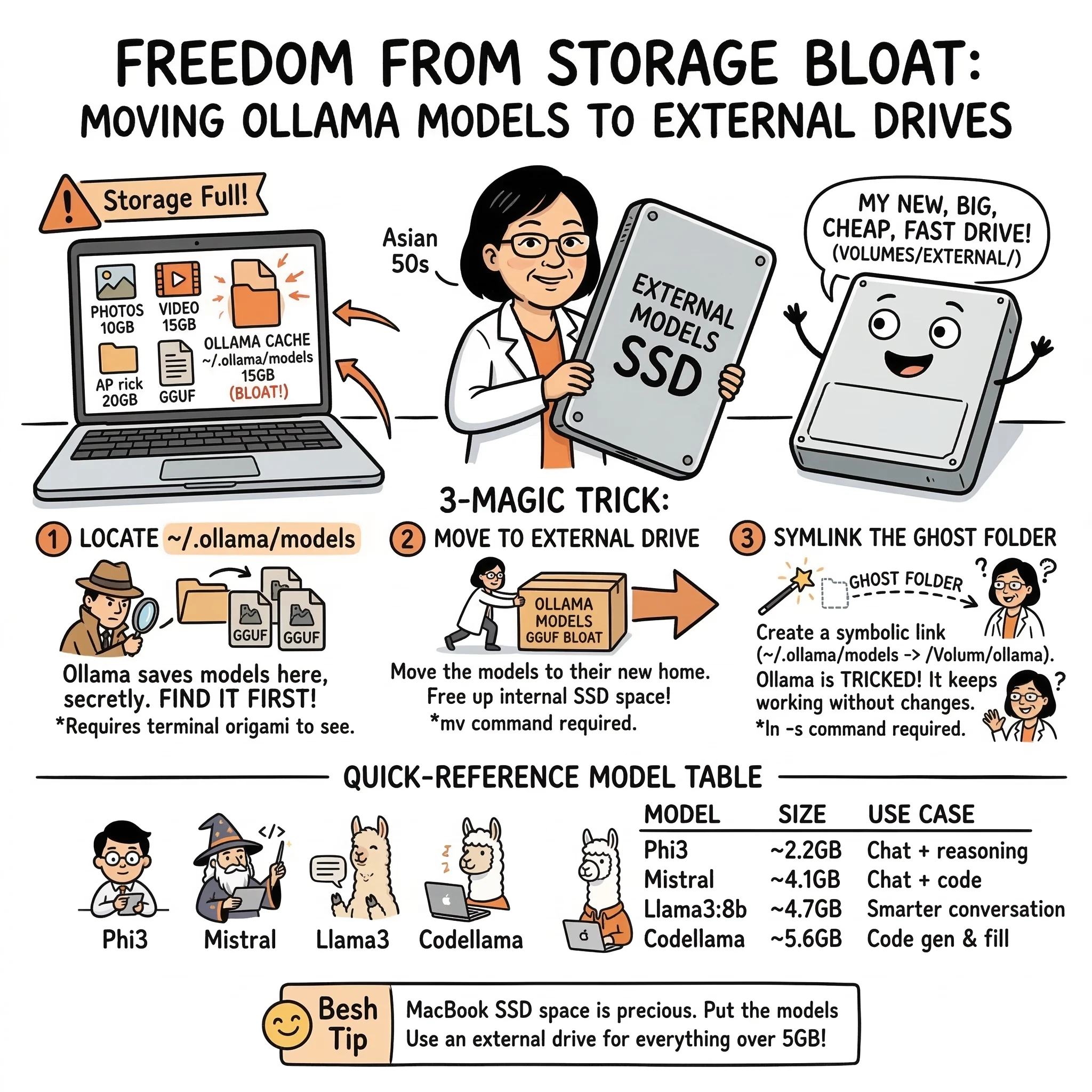
TL;DR
Models are secretly stored in ~/.ollama/models
Why This Guide?
Other guides (like this gist) touch on this, but:
What You’ll Need
Step-by-Step Instructions
1. Locate Ollama’s Storage Folder
Ollama doesn’t mention this anywhere, but it saves models to:
~/.ollama/models
Check if it exists:
ls -lah ~/.ollama/models
You’ll likely see folders and files totaling 5–15 GB, depending on how many models you’ve pulled.
2. Create a Destination on Your External Drive
Plug in your external and make a folder for Ollama:
mkdir -p /Volumes/_EXTERNAL_DRIVE_NAME/_PATH_TO_/ollama
3. Move the Models
mv ~/.ollama/models /Volumes/_EXTERNAL_DRIVE_NAME/_PATH_TO_/ollama
You now have freed up internal storage.
4. Symlink It Back
Ollama expects the folder to be in ~/.ollama/models, so we trick it:
ln -s /Volumes/_EXTERNAL_DRIVE_NAME/_PATH_TO_/ollama ~/.ollama/models
This way, the CLI keeps working as if nothing changed.
5. Test It
List models:
ollama list
Run a model:
ollama run deepseek-r1:7b
If it responds — your symlink works.
6. Optional: Set the OLLAMA_MODELS Environment Variable
You can use this instead of a symlink, but it’s less reliable in current builds:
echo ‘export OLLAMA_MODELS="/Volumes/2USBEXT/DEV/ollama"’ >> ~/.zshrc
source ~/.zshrc
Use it only if you want to switch between different drives easily.
Bonus Section: Best Models for M1 Macs
I tested a bunch, and these are fast + stable:
| Model | Use Case | Size | Notes |
|---|---|---|---|
| phi3 | Chat + reasoning | ~2.2 GB | Fast, small, ideal for M1 |
| mistral | Chat + code | ~4.1 GB | Great all‑rounder |
| llama3:8b | Smarter conversation | ~4.7 GB | Best Meta model < 10 GB |
| codellama | Code gen & fill | ~5.6 GB | If you’re building code tools |
| gemma:2b | Lightweight anything | ~1.4 GB | Tiny model for light tasks |
Pull with:
ollama pull phi3
ollama pull mistral
ollama pull llama3
All of them will now download straight to your external drive thanks to the symlink.
Cleanup Tip
Want to find where that space went?
du -sh ~/.ollama/*
Or if you’re really unsure where Ollama is hiding files:
sudo find /Users -name "*.gguf" 2>/dev/null
Cleanup Tip
Ollama is fast and powerful, but its CLI assumes you’re fine giving up 10–20 GB of SSD space without asking.
This guide puts that control back in your hands — and hopefully saves a few MacBook lives in the process.
🧠 Frequently Asked Questions: Ollama Storage
Quick answers for common storage and performance concerns.
1) Core Storage & Path FAQs
Where does Ollama store models on macOS by default?
By default, Ollama stores models in the hidden directory ~/.ollama/models within your user home folder.
Can I just move the folder through Finder?
It’s safer to use the Terminal for this to ensure hidden files are handled correctly and to create the symbolic link (symlink) that Ollama needs to find the new location.
What is a symlink and why do I need it?
A symbolic link (symlink) acts like a shortcut. By creating one, you tell macOS that whenever Ollama looks for ~/.ollama/models, it should actually go to your external drive.
2) Troubleshooting & Performance FAQs
Will models run slower from an external drive?
If you are using a USB 3.0 or SSD external drive, the performance impact is usually negligible for inference. However, initial model loading might take a few seconds longer compared to an internal NVMe SSD.
What happens if I open Ollama without the drive plugged in?
Ollama will see an empty directory or a broken link and won’t find your models. Simply plug the drive back in and restart Ollama to restore access.
Can I use the OLLAMA_MODELS environment variable instead?
Yes, you can set OLLAMA_MODELS=/Volumes/YourDrive/ollama in your .zshrc, but the symlink method is often more ‘set and forget’ across different terminal sessions and apps.
3) Maintenance FAQs
How do I move models back to internal storage?
Delete the symlink (rm ~/.ollama/models), move the folder back from your external drive to ~/.ollama/, and restart the Ollama service.
Does this work for Linux or Windows too?
The concept is the same, but the paths differ. On Linux, the default path is usually /usr/share/ollama/.ollama/models. On Windows, it’s typically in your user AppData folder.
How can I see which models are taking up the most space?
Run ollama list to see sizes, or use du -sh ~/.ollama/models/* in your terminal for a detailed breakdown per model file.
Explore the Framework
These concepts are part of a broader framework for building intent-aware AI systems. I've distilled these strategies into a short, practical guide called Thinking Modes.
View the Book →END_OF_REPORT 🌿✨