


Using Ollama and Claude CLI as your interface, you can work with large cloud AI models like Nemotron 3 Nano, GLM 4.7, and Kimi‑K2 while your own machine stays fast and cool. Ollama as a gateway and Claude Code CLI
You don’t need a GPU‑heavy machine to use large language models.
With Ollama acting as a local gateway and the Claude Code CLI as your interface, you can talk to cloud‑hosted open models while your laptop stays cool and responsive.
Your computer becomes the control panel. The cloud does the heavy lifting.

What This Ollama and Claude CLI Setup Actually Does
Your laptop → Claude CLI → Ollama → Cloud inference
The models are not running on your machine. They are hosted remotely, and Ollama forwards your requests to them.
This means:
- No GPU upgrade required
- No RAM overload
- No laptop overheating
- Access to large, capable models anyway
1. Install Ollama
Download and install Ollama from:
Verify installation:
ollama --version
2. Confirm You Can Run Cloud Models
Ollama supports cloud‑hosted variants of some open models.
Many Ollama cloud models use :cloud or -cloud style suffixes, but you should always use the exact model name shown in Ollama’s library:
ollama run <model-name>:cloud
Examples:
ollama run glm-4.7:cloud
ollama run kimi-k2.5:cloud
ollama run nemotron-3-nano:30b-cloud
ollama run devstral-small-2:24b-cloud
ollama run minimax-m2.1:cloud
ollama run gemini-3-pro-preview:latest
ollama run gemini-3-flash-preview:latest
ollama run gpt-oss:120b-cloud
ollama run gpt-oss:20b-cloud
If the model starts without downloading gigabytes locally, you’re using cloud inference correctly.
3. Install Claude Code CLI
You’ll use the Claude Code CLI as your main interface for chatting with and coding alongside these models.
Install via npm
npm install -g @anthropic-ai/claude-code
Verify installation:
claude --version
You do not need to log in with a paid Anthropic key for this setup, since we’ll route requests through Ollama instead.
This setup becomes much more powerful when you use the Claude CLI as your daily interface.
Install it using the official instructions from Anthropic. Once installed, you’ll be able to point Claude at Ollama instead of Anthropic’s hosted models.
4. Create a Clean Ollama Wrapper for Claude
Instead of repeating environment variables every time, define a helper alias or function in your shell config (.zshrc or .bashrc).
Base wrapper
alias claude-ollama='ANTHROPIC_AUTH_TOKEN=ollama \
ANTHROPIC_BASE_URL=http://localhost:11434 \
ANTHROPIC_API_KEY="" \
claude'
This tells Claude CLI to:
- Send requests to Ollama
- Use Ollama as the “auth provider”
- Skip real Anthropic API keys
5. Create Model Shortcuts (Much Cleaner)
We use aliases instead of changing Claude’s global configuration so your default Claude setup stays untouched. This lets you switch between standard Claude usage and Ollama‑routed cloud models without breaking anything or rewriting config files.
Now you can make readable aliases for each cloud model:
alias glm='claude-ollama --model glm-4.7:cloud'
alias kimi-k2='claude-ollama --model kimi-k2.5:cloud'
alias nemo='claude-ollama --model nemotron-3-nano:30b-cloud'
Run them in the terminal:
glm
kimi-k2
nemo
And Claude CLI will talk to those cloud‑hosted models through Ollama.
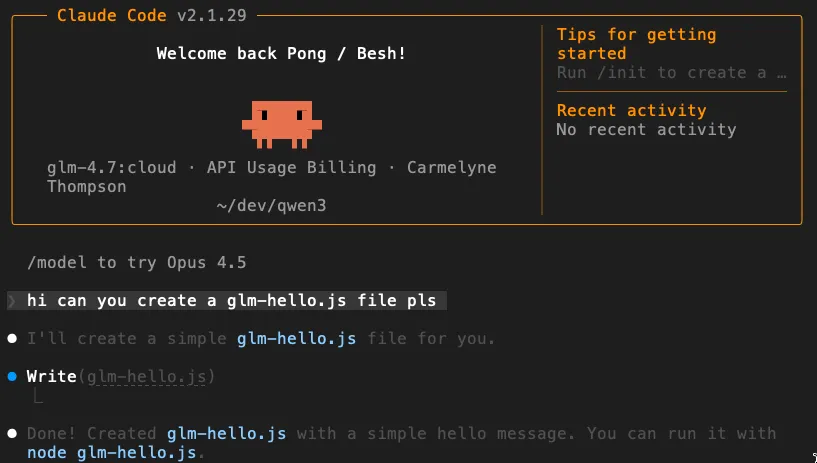
6. These Cloud Models Can Use Tools Too
Because you’re accessing them through the Claude Code CLI, these cloud‑inferenced models aren’t limited to plain chat. They can use the same developer tools Claude normally can, such as:
- Reading and writing files
- Running shell commands like
grep - Performing web searches (when enabled in your CLI setup)
So even though the model is running remotely, it can still act locally through Claude’s tool layer. Your laptop becomes the execution environment, while the cloud model provides the intelligence.
This is what makes the setup powerful: lightweight hardware, full developer‑agent capabilities.
7. What You Just Built
You now have a hybrid AI setup:
- Local machine → lightweight routing
- Cloud GPUs → heavy reasoning
Your laptop stays fast and quiet while you still get access to large‑scale models.
This is especially useful if you:
- Use a MacBook Air or older laptop
- Work while traveling
- Don’t want to maintain a local GPU setup
Free Tier and Paid Limits
Ollama offers a Free tier, with paid plans such as Pro at $20/month and Max at $100/month if you need higher limits.
You’re essentially renting bursts of supercomputer time only when you need it.
Cloud Model Reference Table
| Model Name | Parameters | Core Focus / Capabilities |
|---|---|---|
| glm-5:cloud | 744B (40B active) | Advanced reasoning, systems engineering |
| qwen3-vl:cloud | 235B+ | State-of-the-art vision & thinking |
| devstral-2:cloud | 123B | Codebase exploration, multi-file editing |
| nemotron-3-super:cloud | 120B (MoE) | NVIDIA; complex multi-agent apps |
| qwen3.5:cloud | 122B (Max) | Multimodal, vision, thinking, tools |
| qwen3-next:cloud | 80B | High parameter efficiency & speed |
| nemotron-3-nano:cloud | 30B | Optimized agentic workflows |
| devstral-small-2:cloud | 24B | Specialized software engineering agents |
| kimi-k2.5:cloud | (N/A) | Multimodal agentic, instant/thinking modes |
| minimax-m2.5:cloud | (N/A) | Productivity, coding, high-efficiency |
| gemini-3-flash:preview | (N/A) | Frontier speed & multimodal reasoning |
| deepseek-v3.2:cloud | (N/A) | High efficiency, agent performance |
Summary
- Ollama handles routing.
- Claude CLI gives you a powerful developer interface.
- The cloud runs the big models.
Your laptop just orchestrates everything.
And that’s a very efficient way to work with modern LLMs.
Quick Reference: Can I…? / Do I need…?
A tactical checklist for scaling your inference without scaling your hardware.
- Can I use Ollama cloud without a GPU? Yes. The model inference runs in Ollama’s cloud instead of on your laptop.
- Can I use Claude Code with Ollama cloud? Yes. Ollama supports Claude Code through an Anthropic-compatible API.
- Do I need to pull models locally first? Usually, yes. Pulling a supported cloud model makes it available to your Ollama install.
- Can I disable cloud later? Yes. Use
OLLAMA_NO_CLOUD=1or disable cloud inserver.jsonfor a local-only setup. - What does Ollama say about data retention? Ollama says its cloud does not retain your data.
Summary: This setup lets a lightweight laptop act as a practical control surface for much larger cloud-hosted models. 🌿✨
The Truly Deep Ollama Cloud FAQ
For developers who want a clearer picture of how Ollama cloud models behave, connect, and fit into real workflows.
1) Core concept / explainer FAQs
What are Ollama cloud models?
Ollama cloud models are models that run on Ollama’s cloud infrastructure instead of your own machine, while still working through the same Ollama tooling and local workflows.
How are cloud models different from local Ollama models?
Local models run on your hardware. Cloud models are offloaded to Ollama’s cloud, which lets you use larger models without needing a strong local GPU.
Do Ollama cloud models still use my laptop?
Yes, but mostly as the control layer. Your laptop handles the local tools, terminal, files, and routing, while the heavy model inference runs in the cloud.
Do I need a GPU to use Ollama cloud models?
No powerful GPU is required for cloud models, because the model execution is offloaded to Ollama’s cloud service.
Why would I use cloud models instead of local models?
Cloud models are useful when you want bigger models, more reasoning power, or better performance than your laptop can comfortably run locally.
Is Ollama cloud still “Ollama,” or is it a totally different product?
It is still Ollama. The docs describe cloud models as a new kind of model in Ollama, not a separate tool.
Is this basically a hybrid setup?
Yes. Your local machine provides the interface and tool environment, while the cloud provides the model compute.
Is Ollama cloud only for coding?
No. Ollama positions it for coding, document analysis, and other tasks. It is a general way to use large cloud models from lightweight hardware.
2) Beginner “how do I start?” FAQs
How do I start using Ollama cloud models?
You need Ollama installed and an Ollama account. Then sign in locally with ollama signin and run a supported cloud model.
Do I need an Ollama account to use cloud models?
Yes. Ollama’s cloud models require an account on ollama.com.
What command signs me in?
Use ollama signin. That authenticates your local Ollama install for cloud-backed commands.
What does a cloud model command look like?
A typical example is ollama run gpt-oss:120b-cloud. Cloud model names typically include a :cloud or -cloud style suffix.
Do I need to pull a cloud model first?
Usually yes. You should ollama pull the model name before accessing it through code or API.
Will Ollama download gigabytes to my machine for cloud models?
Not in the same way as running local large models. If the model starts without downloading gigabytes locally, cloud inference is working correctly.
Can I browse available cloud models?
Yes. Ollama points users to its model library, and there is also a cloud-model search page.
3) Model naming / selection FAQs
How do I know whether a model is a cloud model?
Look for Ollama’s supported cloud model naming in the library, often using forms like :cloud or -cloud.
Are all Ollama models available in cloud mode?
No. You must check the supported models list in the Ollama model library.
Can I use models like Kimi, GLM, or Nemotron through Ollama cloud?
Yes. Examples include glm-4.7:cloud, kimi-k2.5:cloud, and nemotron-3-nano:30b-cloud.
Can I switch between different cloud models easily?
Yes. Ollama’s Claude Code integration allows launching Claude with a chosen model, and you can use aliases for switching models quickly.
4) Local vs remote architecture FAQs
Are Ollama cloud models running on my machine?
No. The inference is remote. Your machine acts as the local environment and interface layer.
If the model is remote, can it still interact with my local files?
Yes, when used through a local tool layer like Claude Code. The model can still act locally through Claude’s tool layer while the model itself runs remotely.
Does cloud inference make my laptop cooler and lighter to use?
Yes: less RAM pressure, less overheating, and no need for a GPU-heavy machine when using cloud-hosted models.
Is this a good setup for MacBook Air or older laptops?
Yes. It is a strong fit for lightweight laptops, travel workflows, and setups where you do not want to maintain a GPU rig.
5) Authentication / access FAQs
Do I need an API key for local Ollama?
No. Ollama’s local API at http://localhost:11434 does not require authentication.
When do I need authentication?
Authentication is required for cloud use through ollama.com, publishing models, and downloading private models.
What are the two auth methods for cloud access?
Ollama supports signing in locally with ollama signin or using API keys for direct access to https://ollama.com/api.
What is OLLAMA_API_KEY for?
It is used for direct programmatic access to ollama.com’s hosted API.
If I sign in locally, do I still need to manually attach auth headers for local cloud-routed commands?
No. Once signed in, Ollama automatically authenticates commands as needed.
6) Two access paths FAQs
What are the two main ways to use Ollama cloud models?
1) Through your local Ollama installation, where Ollama can route supported requests for you, and 2) through Ollama’s hosted API for direct programmatic access.
What is the difference between local routing and direct cloud API access?
With local routing, you talk to your local endpoint and Ollama handles the cloud offload. With direct access, you call ollama.com as the remote host and authenticate yourself.
Which one is better for beginners?
For beginners, the local route is simpler because ollama signin handles everything and you can keep using local endpoints.
7) Claude Code / Claude CLI FAQs
Can Ollama cloud models be used inside Claude Code?
Yes. Ollama supports Claude Code through an Anthropic-compatible API.
What does Claude Code add on top of Ollama cloud?
Claude Code gives you an agentic coding interface that can read files, modify code, and execute commands locally.
Is there a quick setup command for Claude Code with Ollama?
Yes: ollama launch claude. You can also specify a model directly.
What environment variables are used for manual Claude Code setup with Ollama?
Use ANTHROPIC_AUTH_TOKEN=ollama, ANTHROPIC_API_KEY="", and ANTHROPIC_BASE_URL=http://localhost:11434.
Can cloud models used through Claude Code still access tools?
Yes. Through Claude Code, these models can use tools like reading/writing files, running shell commands, and web search.
8) API and developer integration FAQs
Can I use Ollama cloud models from Python or JavaScript?
Yes. The Ollama client supports both local and direct hosted API access for Python and JS.
Can I call cloud models with cURL?
Yes, using local endpoints or direct hosted usage at https://ollama.com/api/chat with bearer auth.
Does Ollama have OpenAI-compatible endpoints too?
Yes. Ollama provides compatibility with parts of the OpenAI API, including /v1/chat/completions.
9) Capability FAQs
Do Ollama cloud models support streaming?
Yes. Streaming is a documented capability and supported in all major client SDKs.
Do cloud models support tool calling?
Yes, Ollama supports tool calling as a platform capability.
Do cloud models support vision, structured outputs, and embeddings?
Yes, these are all documented as Ollama platform capabilities, though support depends on the specific model selected.
10) Pricing / quota / plan FAQs
Is Ollama cloud free?
Ollama’s Free plan includes access to cloud models. Paid tiers like Pro ($20/mo) and Max ($100/mo) offer higher limits.
What does the Pro plan add?
Pro includes more cloud usage, the ability to run multiple cloud models concurrently, and private-model features.
What does the Max plan add?
Max adds higher cloud usage limits, more concurrent cloud models, and larger private-model collaboration limits than Pro.
Is Ollama cloud usage unlimited?
No. Ollama offers different usage levels across Free, Pro, and Max plans, so limits still apply.
11) Privacy / control FAQs
Can I disable Ollama cloud completely?
Yes. You can enforce local-only mode by setting disable_ollama_cloud: true in server.json or using OLLAMA_NO_CLOUD=1.
What does Ollama say about cloud data retention?
Ollama says its cloud does not retain your data. If you want a stricter local-only setup, you can disable cloud features entirely.
12) Troubleshooting / confusion FAQs
Why is my cloud model failing even though local models work?
Common causes include not being signed in (ollama signin), using the wrong model name, or hitting usage limits.
Where can I inspect Ollama logs?
Check ~/.ollama/logs/server.log on Mac or use journalctl on Linux.
13) Comparison / buyer-intent FAQs
Should I use Ollama cloud or buy a stronger GPU?
If you want occasional access to larger models without maintaining hardware, Ollama cloud is the lower-friction option. Local is better for 24/7 offline usage.
Who is Ollama cloud best for?
It is a good fit for developers who want access to larger models without maintaining dedicated GPU hardware.
Who may not need Ollama cloud?
If you want fully local, offline inference and you already have hardware that runs your models comfortably, you may not need it.
14) Workflow-specific FAQs
Can I use Claude Code with Kimi or GLM through Ollama cloud?
Yes. Ollama recommends models like kimi-k2.5:cloud and glm-5:cloud for use with Claude Code.
Can I use Nemotron through Ollama cloud on a lightweight laptop?
Yes. That is one of the main advantages of Ollama cloud: using larger models without needing a heavyweight local GPU setup.
Do I need to replace my normal Claude setup?
No. Use aliases as recommended in the article to keep your default Claude setup untouched.
Explore the Framework
These concepts are part of a broader framework for building intent-aware AI systems. I've distilled these strategies into a short, practical guide called Thinking Modes.
View the Book →Carmelyne is a Full Stack Developer and AI Systems Architect. She is a previously US-bound Filipino solopreneur, former Media and Information Literacy and Empowerment Technologies instructor, and the author of Thinking Modes: How to Think With AI — The Missing Skill.
END_OF_REPORT 🌿✨