

Hello there, fellow explorer! Today, we’re about to embark on a journey into the intriguing world of Catbird.ai. Imagine having a tool that takes your wildest thoughts and spins them into visual realities. Sounds like a dream, right? Well, that’s Catbird.ai for you.
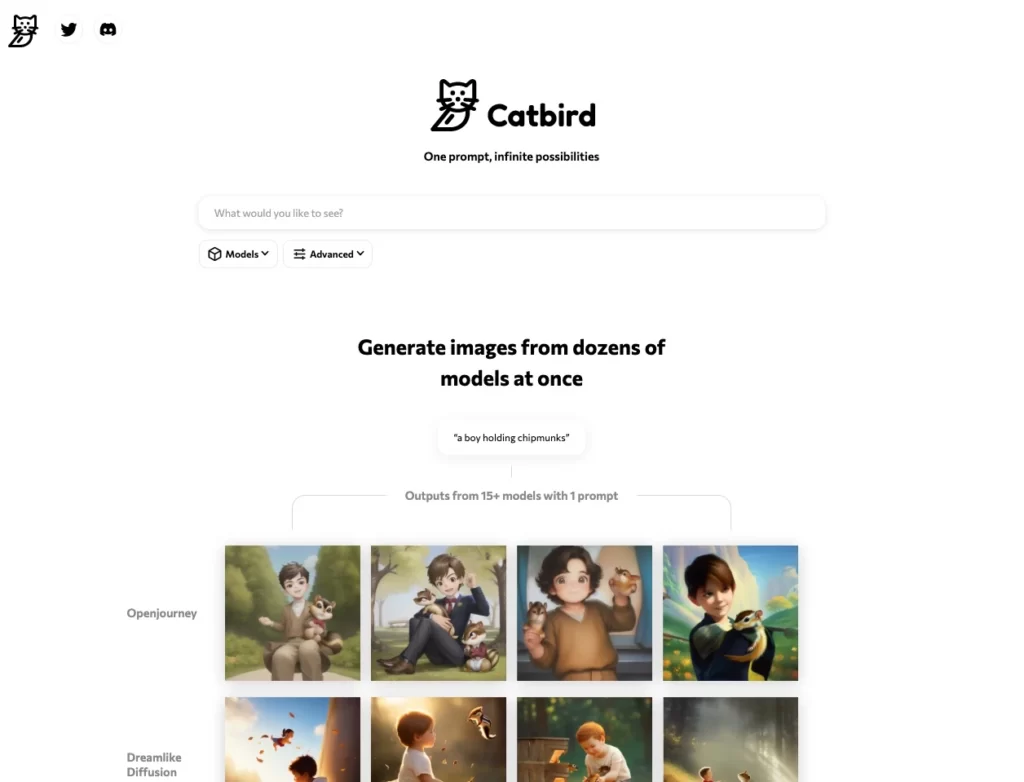 https://www.catbird.ai/
In the vast landscape of creative AI tools, Catbird.ai emerges as a unique gem. It listens to your ideas, processes them through multiple AI models, and churns out visual delights that are as unique as your thoughts. Picture it like a friendly artist, taking your abstract prompts and using them to create a spectrum of visual wonders.
But hey, don’t just take my word for it! Join me as we dive deeper into the world of Catbird.ai, exploring its features, understanding its models, and even comparing it with other big players in the AI field. So, buckle up and let’s start this exciting journey. Remember, every step we take is a leap towards uncharted territories of creativity. Ready? Let’s go!
Navigating Catbird.ai
Catbird.ai is refreshingly simple to navigate. Everything is accessed directly from their website – no need to bother with a Discord bot or additional apps. Once you’ve landed on their page, you’re ready to dive into a world of creative possibilities. The intuitive interface makes it easy to grasp, so even if you’re an AI newbie, you won’t feel lost. It’s like finding your way through a well‑designed digital playground.
Remember, though, that while Catbird.ai may be easy to navigate, the true magic happens when you start exploring its unique features in depth. So, buckle up and get ready for a tour of this fascinating AI image generation tool.
The Unique User Interface of Catbird.ai
With Catbird.ai, you’re not just working with one model, but potentially up to six at a time. It’s like having an orchestra of AI models waiting for your baton’s command. You simply pick and choose from a wide selection of models, each with its unique perspective and style.
This feature is not just a fancy frill but is genuinely transformative in terms of the image generation process. Here’s how it works: when you input your prompt, Catbird.ai splits the task among the chosen models. Each model then provides its own interpretation of the prompt, contributing to a collection of images.
Now, imagine the dynamic interplay of perspectives and interpretations from the different models. This isn’t just a one‑man show; it’s a harmonious collaboration. The end result? A rich, intricate, and potentially unexpected piece of AI‑generated artwork, beautifully reflecting the intelligence of the chosen models.
And the best part? You get to orchestrate all this with just a few clicks, thanks to Catbird.ai’s user‑friendly interface. So go ahead, flex your creative muscles and experiment with the mix‑and‑match of models. You never know what stunning pieces of images you’ll conjure next!
Understanding Catbird.ai’s Models
When using Catbird.ai, you’ll be spoilt for choice, as it offers a variety of model categories. It’s like walking into a candy store, each section filled with different flavors and colors. Let’s break down these categories and delve into what each one brings to the table:
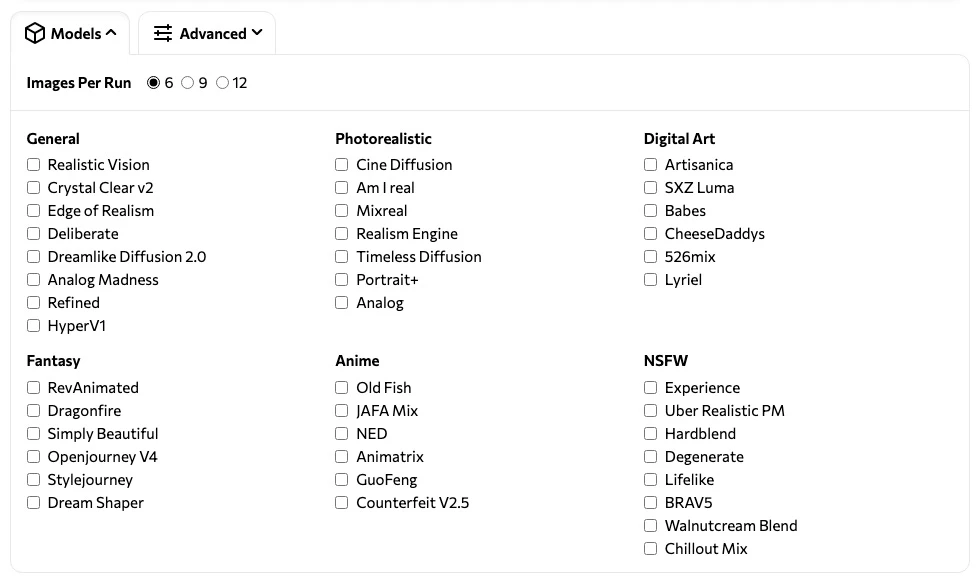
1. General
These models, such as Realistic Vision and Crystal Clear V2, are your all‑rounders. They provide a balanced perspective, offering a good mix of realism and imagination in their outputs.
- Realistic Vision
- Crystal Clear V2
- Edge of Realism
- Deliberate
- Analog Madness
- Dreamlike Diffusion 2.0
- HyperV1
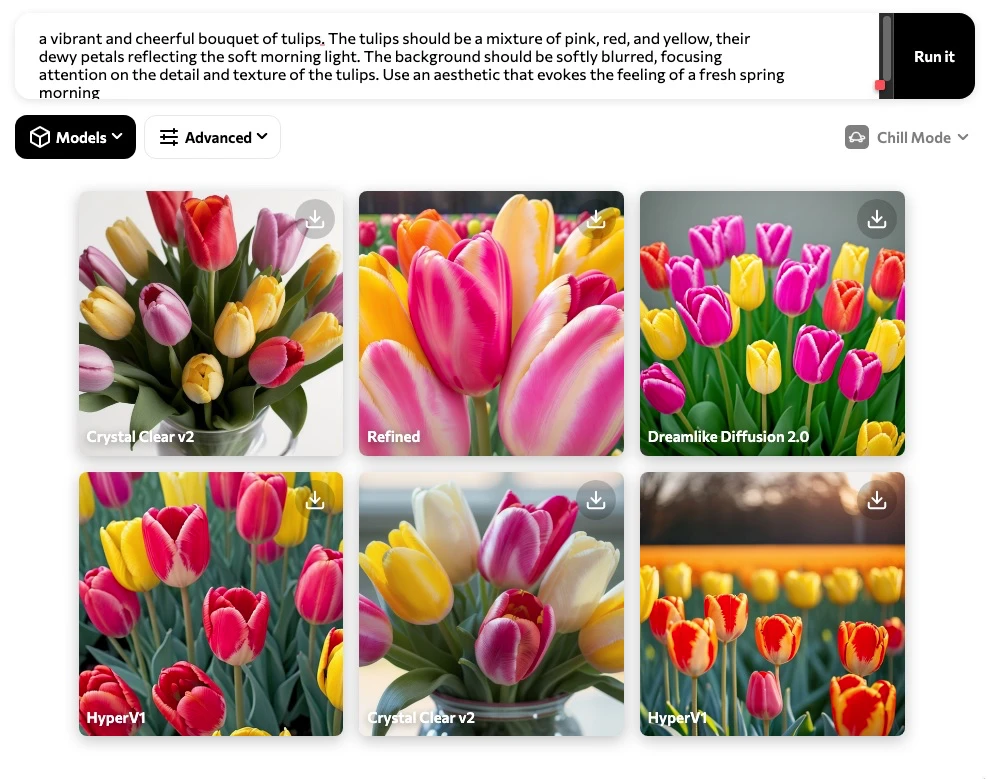
Prompt: “Pha vibrant and cheerful bouquet of tulips. The tulips should be a mixture of pink, red, and yellow, their dewy petals reflecting the soft morning light. The background should be softly blurred, focusing attention on the detail and texture of the tulips. Use an aesthetic that evokes the feeling of a fresh spring morningoto of a cat.”
2. Fantasy
Step into a world of magic and wonder with models like RevAnimated and Stylejourney. These models add a whimsical touch to your prompts, perfect for generating fantastical landscapes or mythical creatures.
- RevAnimated
- Openjourney V4
- Stylejourney
- Dream Shaper
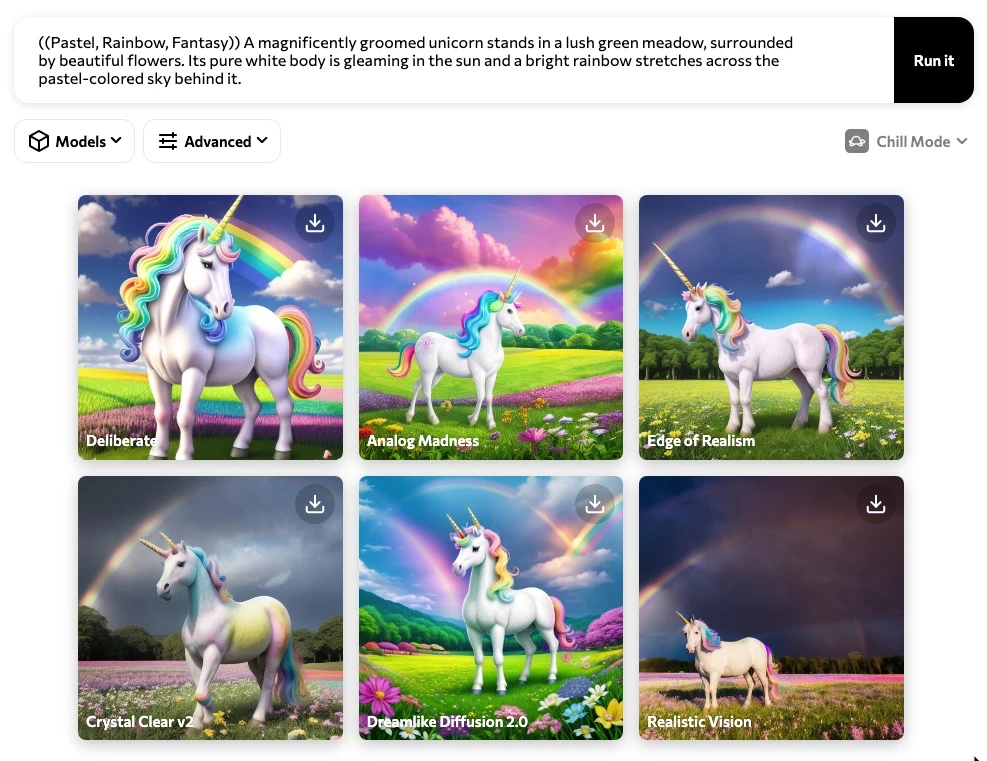
Prompt: ((Pastel, Rainbow, Fantasy)) A magnificently groomed unicorn stands in a lush green meadow, surrounded by beautiful flowers. Its pure white body is gleaming in the sun and a bright rainbow stretches across the pastel‑colored sky behind it.
3. Anime
Models such as Old Fish and Walnutcream Blend are your go‑to for anime‑style artwork. They’re great at creating vibrant, exaggerated features typical of anime characters and scenes.
- Old Fish
- Walnutcream Blend
- Chillout Mix
- Counterfeit V2.5
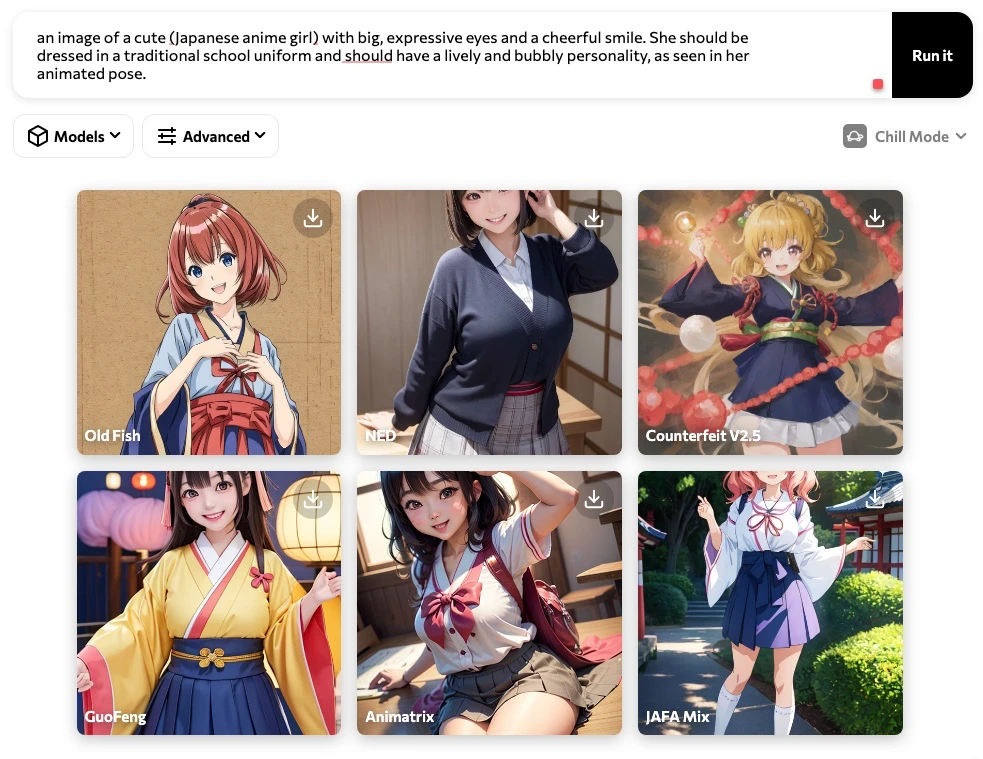
Prompt: “an image of a cute (Japanese anime girl) with big, expressive eyes and a cheerful smile. She should be dressed in a traditional school uniform and should have a lively and bubbly personality, as seen in her animated pose.”
4. Photorealistic
If you’re after lifelike images, models like Cine Diffusion and Realism Engine are your best bet. They strive to generate outputs that mirror reality as closely as possible.
- Cine Diffusion
- Am I Real
- Realism Engine
- Timeless Diffusion
- Portrait+
- Analog
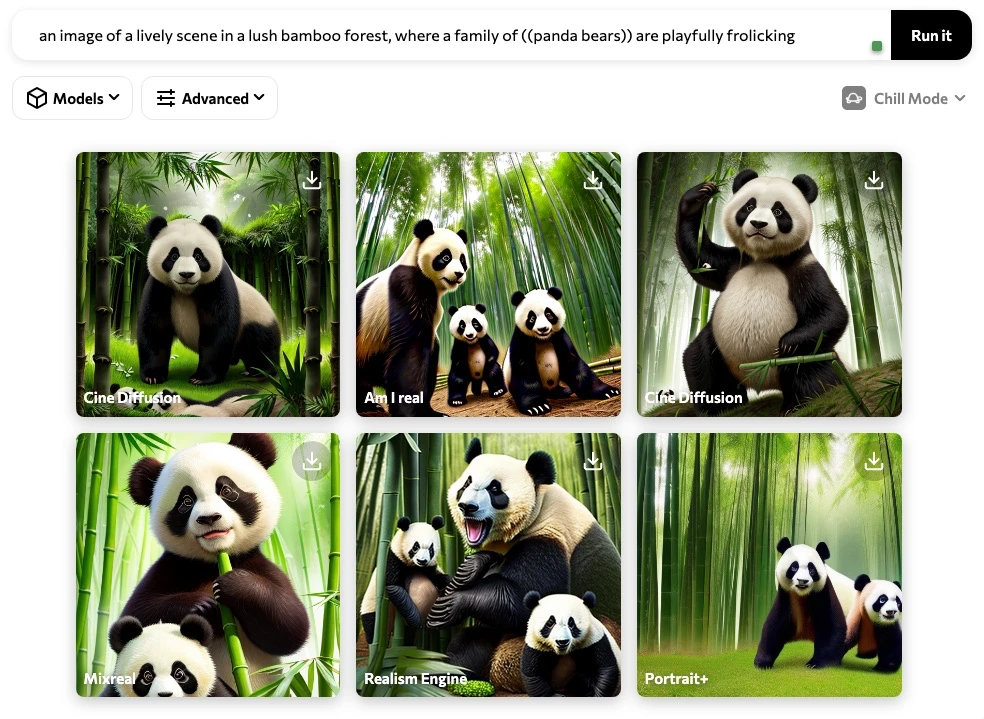
Prompt: “an image of a lively scene in a lush bamboo forest, where a family of ((panda bears)) are playfully frolicking.”
5. Digital Art
For a more abstract and experimental touch, consider models like Artisanica and Mixreal. They can add a unique digital‑art aesthetic to your creations.
- Artisanica
- Mixreal
- CheeseDaddys
- 526mix
- Lyriel
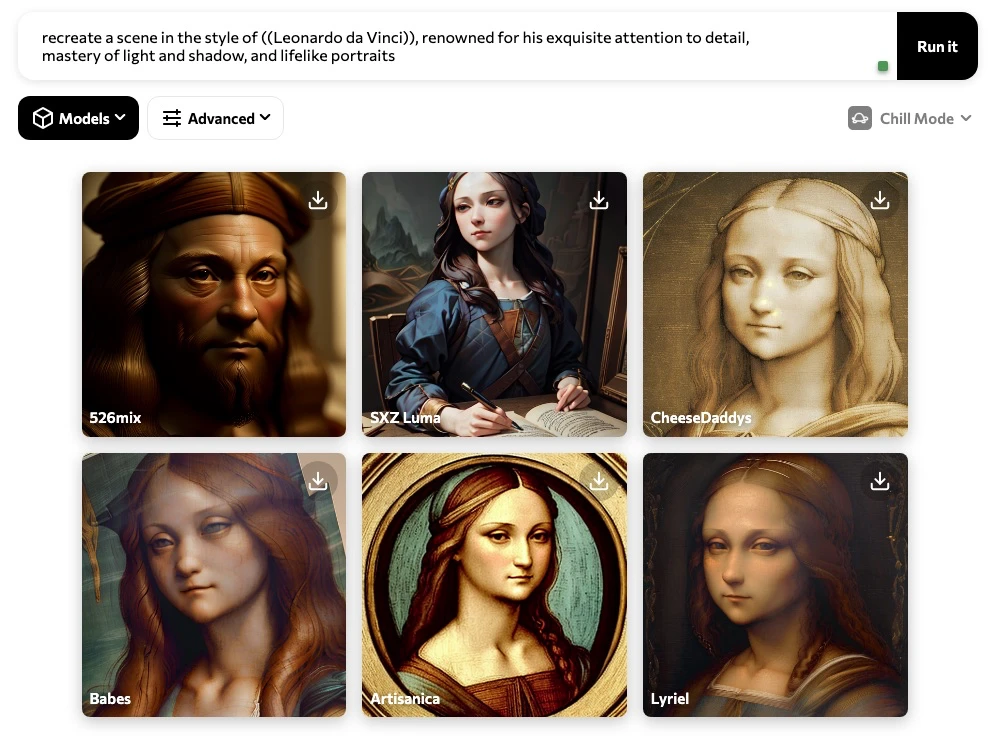
Prompt: “recreate a scene in the style of ((Leonardo da Vinci)), renowned for his exquisite attention to detail, mastery of light and shadow, and lifelike portraits.”
6. NSFW
Models in this category, like Uber Realistic PM and Lifelike, are designed for generating more mature and adult‑oriented content. Use them responsibly and within ethical boundaries.
- Experience
- Uber Realistic PM
- Hardblend
- Degenerate
- Lifelike
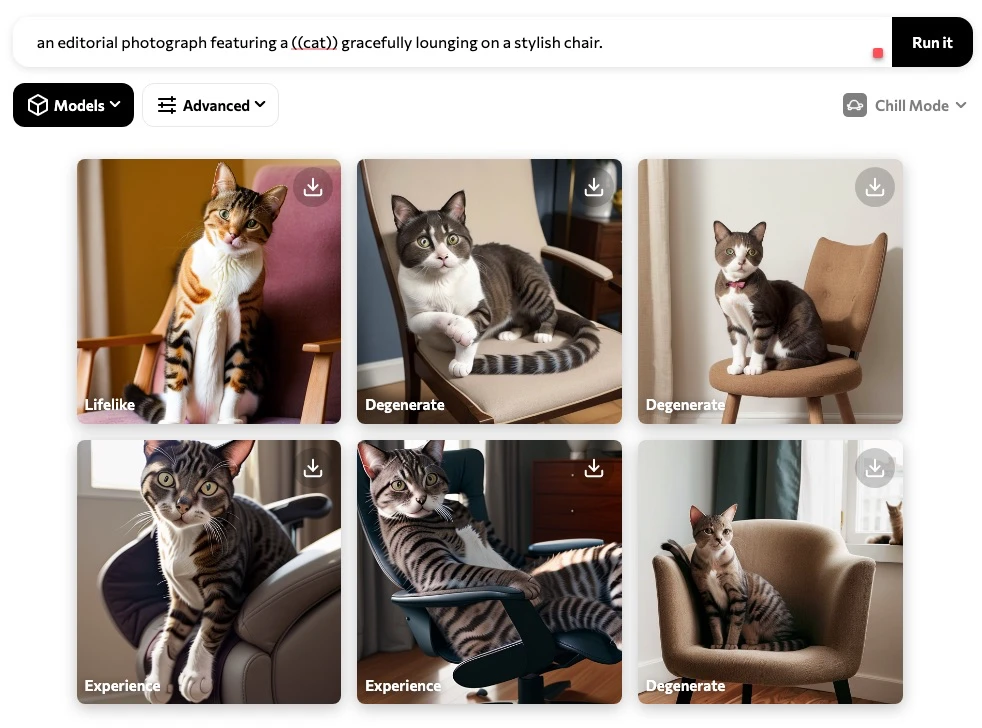
Prompt: “an editorial photograph featuring a ((cat)) gracefully lounging on a stylish chair.”
Each model category has its unique style and approach to image generation. The model you choose can significantly influence the outcome—think of it as picking the right brush for a painting. Experiment, mix, and match until you find the combo that aligns with your creative vision.
Mastering the Art of Prompting in Catbird.ai
As with many AI tools, Catbird.ai’s performance is heavily influenced by the quality of the prompts you input. With a well‑crafted prompt, you can guide the AI toward an image that closely matches your vision. Unsure how to refine your prompt? That’s where Catbird’s Improve Prompt feature steps in.
Improves Prompt
This innovative feature is like having a creative collaborator at your side, helping you enhance your initial idea with fresh perspective. When you input a basic prompt such as “a robot sitting and thinking”, clicking Improve Prompt will transform it into a more elaborate description:
“*((cyberpunk)) A rusty robot sits at the edge of a broken highway, overlooking a ruined city. It raises its head, deep in thought, peering through the lens of its blue, flickering eyes. The sky is an orange‑red hue, reflecting the pollution that lingers in the air. Its metallic frame shines in the dim light of the dying sun, and you can hear the sound of its gears turning as it contemplates the post‑apocalyptic world that surrounds it.”
The feature essentially expands your original idea, adding elements that steer the AI in a more specific direction. Think of it as turning a rough sketch into a detailed blueprint.
Remember, the quality of the output often hinges on the quality of the input. With Improve Prompt, Catbird.ai gives you a tool to elevate your prompts—and, by extension, the images you generate.
Optimizing Your Use of Catbird.ai
Harnessing the power of Catbird.ai involves more than just typing a prompt and hitting generate. Below are a few tricks and techniques to keep in your toolbox.
Single and Double Parenthesis
Weight important aspects of your prompt with parentheses. Wrapping words in (single parentheses) gives them a subtle boost. Want extra emphasis? Use double parentheses:
((han solo hugging a robot)) on the edge of a cliff, photorealistic, cg
Prompt example:
“A beautiful slender woman ((in the style of René Gruau)), wearing a flowing red dress, stands in a lush green meadow with sunlight streaming through the trees above her. She holds a bouquet of purple wildflowers in her delicate hands and a small bird rests on her shoulder. The breeze gently stirs her hair as she gazes into the distance, lost in thought.”
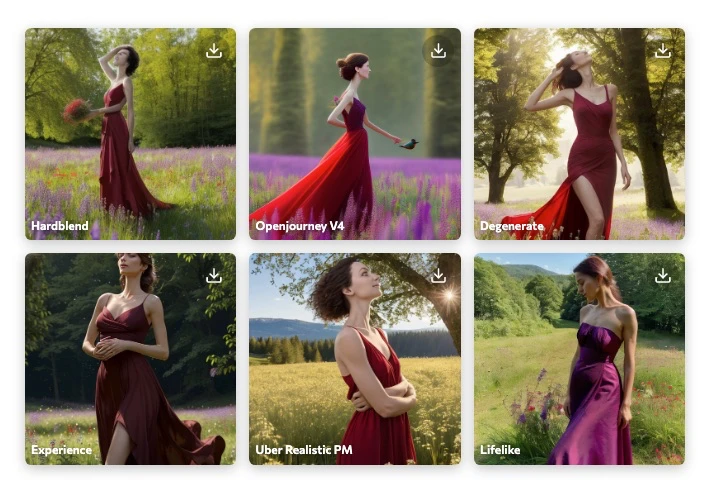 ((in the style of René Gruau))
Advanced Settings
Click the Advanced Settings button to fine‑tune your generation:
- Negative prompts – tell the model what you don’t want.
- Seed, steps, guidance scale – control randomness and fidelity.
- Aspect ratio – choose your canvas shape.
Playing with these options lets you steer the AI toward results that match your exact needs.
Comparing Catbird.ai with Adobe Firefly and Midjourney
When you stack Catbird.ai against other AI image generators like Adobe Firefly and Midjourney, distinct strengths emerge.
- Firefly offers watermark‑protected outputs; Catbird.ai’s images are watermark‑free.
- Copyright: Catbird.ai retains copyrights to generated images, even though they’re free to use. Keep this in mind for commercial projects.
- Midjourney provides a different ecosystem (Discord‑based) and its own set of artistic styles; a deeper comparison deserves its own post.
Overall, Catbird.ai’s multi‑model selection and “improve prompt” tool give it a unique edge in flexibility and creativity.
Catbird.ai is a powerful addition to the AI image‑generation landscape. Its ability to pull together up to six models for a single prompt, paired with an intuitive UI and prompt‑enhancement features, makes it a compelling choice for artists, writers, and any creator looking to visualize ideas quickly. Just stay aware of the copyright considerations when using the outputs.
Catbird.ai Cheat Sheet
- Access – Web app at https://www.catbird.ai/ (no download).
- Unique UI – Select up to six models per generation.
- Model categories – General, Fantasy, Anime, Photorealistic, Digital Art, NSFW.
- Prompt Improvement – Use the “improve prompt” button for richer descriptions.
- Parentheses weighting – (single) for mild emphasis, ((double)) for strong emphasis.
- Advanced Settings – Customize negative prompts, aspect ratio, seed, steps, guidance scale.
- Safe Search – OFF by default; toggle ON to filter NSFW content.
- Copyrights – Images are free to use, but copyrights belong to Catbird.ai.
- Social – Follow on Twitter: https://twitter.com/CatBirdAI for updates and examples.
Remember, the key to mastering Catbird.ai (or any AI tool) is to experiment and have fun!
Glossary
Advanced Settings – Options that let you tweak negative prompts, aspect ratio, seed, steps, and guidance scale.
Aspect Ratio – Width‑to‑height proportion of the generated image.
Catbird.ai – A web‑based AI image generator that supports multiple models per prompt.
Copyrights – Legal rights granting the originator control over reproduction, distribution, and public display.
Image Generation – Creating images from textual inputs using AI models.
Improve Prompt – Feature that expands a basic prompt into a detailed, descriptive version.
Models – Different AI engines (General, Fantasy, Anime, etc.) that interpret prompts.
Negative Prompts – Keywords used to tell the model what to avoid.
NSFW – “Not Safe For Work”; content that may be explicit or adult‑oriented.
Parentheses Usage – Weighting technique: (single) for light emphasis, ((double)) for heavy emphasis.
Safe Search – Filter that blocks explicit content; off by default.
Web App – Software accessed via a browser, no local installation required.
F.A.Q.
Is Catbird.ai free? Yes, it’s currently free to use, but the platform retains the copyrights to generated images.
How do I use it? Visit the website, type a descriptive text prompt, optionally select up to six models, and hit generate. Use “improve prompt” or parentheses for finer control.
Is there a Discord bot? No, Catbird.ai is only available as a web app.
What are “models”? They are the different AI generators (General, Fantasy, Anime, Photorealistic, Digital Art, NSFW) you can choose from.
What does “improve prompt” do? It expands a simple prompt into a richer, more detailed description to guide the AI toward better results.
Can I block unwanted elements? Yes, via Negative Prompts in the Advanced Settings.
What image sizes are supported? Currently only 512 × 512 px is offered.
Where can I find more AI tools? Check out our related post: 15 Powerful AI Tools for Freelancers.
Any tips for better results? Experiment with model combinations, use parentheses for weighting, and refine prompts with the “improve prompt” feature.
Is there a roadmap for larger resolutions? No official announcement yet; keep an eye on Catbird’s updates.
Can I use the images commercially? Images are free to use, but remember the copyrights belong to Catbird.ai; review their terms before commercial deployment.
How do I turn Safe Search on? Toggle the Safe Search switch in the UI; it’s off by default.
Where can I follow Catbird.ai news? Twitter: https://twitter.com/CatBirdAI
What if I encounter bugs? Report them via the contact form on the Catbird.ai website.
Is there an API? Not at this time; the service is web‑only.
Can I give feedback on model outputs? Yes, the platform provides a feedback button for each generated image.
Are there usage limits? Free tier limits are not publicly disclosed; they may apply during high‑traffic periods.
How does Catbird.ai handle privacy? Prompt data is used to improve the service; review their privacy policy for details.
What’s the best way to learn prompt engineering? Start with simple prompts, then iterate using “improve prompt” and weighting techniques.
Will new models be added? The team frequently updates the model list; stay tuned to their announcements.
Can I export the prompt history? The UI currently does not support export; you can copy prompts manually.
Is there a community forum? Not yet; the primary community interaction is through Twitter.
Do they support batch generation? Only one prompt at a time in the free web interface.
Are there plans for desktop clients? No confirmed plans; the focus remains on the web app.
How does Catbird.ai differ from Midjourney’s Discord workflow? Catbird is web‑based with multi‑model selection; Midjourney operates via Discord commands and a single model per prompt.
Can I use the generated images in NFTs? Yes, but respect the copyright ownership by Catbird.ai.
What’s the “experience” model in NSFW? A specialized model tuned for adult‑oriented visual content.
Is there a limit to how many models I can select? Maximum of six models per generation.
Do I need an account? No account is required for basic usage.
How do I report misuse? Use the contact form on the Catbird.ai site to flag inappropriate content.
Will future updates add higher resolution outputs? Potentially; watch for announcements.
Can I integrate Catbird.ai into my own app? Currently no public API is available.
How does “seed” affect results? A seed fixes randomness, allowing reproducible outputs.
What’s the best way to get photorealistic results? Select models under the Photorealistic category and fine‑tune with negative prompts if needed.
Is there a tutorial video? Check Catbird’s official YouTube channel for walkthroughs.
How does the “improve prompt” algorithm work? It leverages a separate LLM to expand and enrich the original text.
Can I change the output format? Images are delivered as PNG; other formats aren’t currently offered.
What hardware is required? Only a modern web browser; no special hardware needed.
Are there any hidden costs? The service is free for now; future pricing has not been announced.
Can I use the tool offline? No, it requires an internet connection.
What’s the difference between “Realistic Vision” and “Edge of Realism”? Both are General‑category models; Realistic Vision leans toward photographic realism, while Edge of Realism adds stylistic edge.
How does Catbird handle copyrighted source material? Generated images are original outputs; however, model training data may include copyrighted works—use responsibly.
Is there a way to batch‑download many images? Not currently; each image must be saved individually.
What does “Analog Madness” produce? An artistic style emulating analog film textures.
Does Catbird support text‑to‑video? No, only static image generation at this time.
How can I stay updated on new features? Follow Catbird’s Twitter and subscribe to their newsletter.
Is there a limit to prompt length? Prompts longer than 300 tokens may be truncated.
Can I request new models? Feature requests can be submitted via the contact form.
Does Catbird support embeddings for style transfer? Not in the current web interface.
Are there any known bugs with double parentheses? Some users report occasional weighting inconsistencies; keep prompts concise.
How does the platform ensure diversity in outputs? Multiple models and random seeds promote varied results.
What’s the “Hardblend” model used for? A NSFW‑oriented model focusing on intense, high‑contrast visuals.
Is there a way to reset settings to default? Yes, the Advanced Settings menu includes a “Reset to Default” button.
Can I use the tool for educational purposes? Absolutely—just respect the copyright notice.
Do the generated images come with a license? They are free to use, but Catbird.ai retains the copyright; refer to their terms for specifics.
Will there be a premium tier? Unannounced; keep an eye on official announcements.
How does Catbird handle user data? See the privacy policy on their site for details on data handling.
Can I share my prompts with the community? Yes, many users post prompts publicly; consider adding a “Prompt Used” section in your blog post.
Is there a way to upvote favorite models? Not currently; model selection is manual.
Do the models support different languages? Primarily English; some models understand basic multilingual prompts.
What’s the “Experience” model’s specialty? Designed for mature, expressive artistic outputs within the NSFW category.
How does Catbird compare to Stable Diffusion? Catbird aggregates multiple pretrained models, some of which are based on Stable Diffusion; its multi‑model feature is a differentiator.
Can I request a custom model? Custom models aren’t supported publicly at this time.
Are there any limits on daily usage? No explicit daily caps, but heavy usage may trigger throttling.
Will there be a mobile app? No plans announced; the web UI is mobile‑responsive.
Is there a community Discord? Not officially; the main community hub is Twitter.
How do I report a bug in the UI? Use the “Report Issue” link in the site footer.
Can I use the tool for brand assets? Yes, but verify the copyright constraints for commercial branding.
What’s the best way to learn weighting with parentheses? Experiment: start with single parentheses for minor elements, double for focal subjects.
Are there any tutorials on prompt engineering? Yes, many creators share guides; search “Catbird.ai prompt guide”.
Does Catbird store my prompts? Prompts may be logged for analytics; check the privacy policy.
Can I adjust the randomness level? Yes, via the “Guidance Scale” in Advanced Settings.
What’s the difference between “Mixreal” and “Artisanica”? Mixreal blends multiple artistic styles; Artisanica focuses on a handcrafted, painterly look.
Are there any plans for 3D generation? No announced features yet.
How does the “Safe Search” toggle work? When ON, it filters out NSFW model outputs.
What does “Analog” produce in Photorealistic? Adds film‑grain and vintage analog characteristics to realistic images.
Is there a limit to the number of images per prompt? You can generate up to six images per prompt, corresponding to the selected models.
Can I create a style guide using Catbird’s outputs? Absolutely—collect images per model to build a cohesive visual reference.
Does the platform offer any analytics? No built‑in analytics; external tools can track usage if desired.
Is the “Improve Prompt” feature AI‑driven? Yes, it uses an LLM to rewrite and enrich your prompt.
Can I hide my prompt history? Prompt history isn’t saved to a user account for public view.
Will the tool support higher‑resolution outputs soon? Potentially; stay tuned to official updates.
How do I clear the canvas between generations? A “Clear” button resets the UI for a fresh start.
Are there any known security concerns? The site uses HTTPS; no major issues reported.
Can I use Catbird for scientific illustration? Yes, with appropriate model selection and detailed prompts.
Do the models support alpha transparency? Outputs are opaque PNGs; no alpha channel.
Is there a way to batch‑process prompts via script? Not currently; the UI is manual only.
What’s the best model for fantasy landscapes? Try “RevAnimated” or “Dream Shaper” under the Fantasy category.
Can I use the generated art for merch? Yes, but respect the copyright ownership by Catbird.ai.
Does Catbird support style transfer from reference images? No direct upload of reference images in the current version.
How does the “seed” affect reproducibility? Setting a seed ensures the same random noise, yielding identical outputs across runs.
Are there any plans for a premium subscription? Unannounced; keep an eye on future announcements.
What’s the “Lifelike” model’s focus? A NSFW model aiming for hyper‑realistic adult content.
Can I suggest new categories? Feature requests can be sent via the contact form.
Is there a way to rate generated images? The UI does not currently have a rating system.
Will future updates add more than six model slots? Potentially; the roadmap may expand this limit.
How to report inappropriate content? Use the “Report” link on the image tile.
Does Catbird have a public roadmap? No publicly available roadmap at this time.
Can I embed generated images in a website? Yes, link or host the PNGs as you would any image.
Is there a developer API for integration? Not yet; the platform is currently web‑only.
Do the models support different aspect ratios? Yes, selectable in Advanced Settings.
Can I use the “Improve Prompt” for text generation? It is designed specifically for image prompt enhancement.
What’s the difference between “Realism Engine” and “Cine Diffusion”? Both focus on photorealism; Cine Diffusion emphasizes cinematic lighting.
How does Catbird handle copyrighted characters? Generated images are original; however, using recognizable characters may raise legal concerns.
Are there any community showcases? Users often share results on Twitter using #CatBirdAI.
Is there a mobile‑optimized UI? The site is responsive but not a dedicated app.
What’s the best way to get started? Choose a model category, type a clear prompt, click generate, then tweak with parentheses or “Improve Prompt”.
Can I create a series of images with a consistent style? Yes—select the same model(s) for each prompt to maintain stylistic consistency.
Will the platform support text‑to‑audio soon? No announced plans for audio generation.
How to handle low‑quality outputs? Experiment with different models, adjust guidance scale, or use more descriptive prompts.
Are there any usage analytics for my own prompts? No built‑in analytics; you can manually track results.
Can I export the prompt‑image pair as a single file? Not directly; you can manually combine them if needed.
Do the models support sketch‑to‑image? The web UI does not accept image inputs; only text prompts.
What’s the origin of the “Crystal Clear V2” model? A General‑category model fine‑tuned for crisp, clean visuals.
Is there a way to prioritize speed over quality? Lower the steps count in Advanced Settings for faster results.
How does Catbird ensure diversity across models? Each model has distinct training data and architecture, yielding varied outputs.
Can I submit a bug report for a specific model? Yes—mention the model name in your report via the contact form.
Will there be a subscription for higher‑resolution renders? Potential future offering; monitor official channels.
How does the “seed” interact with the “guidance scale”? Seed controls randomness; guidance scale influences adherence to the prompt.
Are there any tutorials specific to the NSFW category? Community guides exist; search for “CatBirdAI NSFW prompting”.
Can I use the platform for logo design? Yes, with precise prompts and a suitable model (e.g., General or Digital Art).
Does Catbird offer a “favorites” collection? No, but you can bookmark images in your browser.
Are there any limitations on commercial usage? You may use images commercially, but Catbird.ai retains copyright—review their terms.
What’s the difference between “Hardblend” and “Degenerate”? Both are NSFW models; Hardblend leans toward stylized, high‑contrast art, while Degenerate focuses on more raw, unfiltered outputs.
Can I collaborate with others on prompt engineering? Yes—share prompts and results via social media or collaborative docs.
Does the platform support multilingual prompts? Limited support; English yields the most reliable results.
What’s the best way to get a clean background? Add “background‑less” or “transparent background” in your prompt and use a model that handles negative prompts well.
Is there a way to lock a model selection across sessions? No persistent settings; you must re‑select each session.
Will future updates add a “batch generate” feature? Potentially; keep an eye on release notes.
How does the “Improve Prompt” handle creative flair? It enriches the prompt with descriptive adjectives, setting, and sensory details.
Can I use Catbird for educational diagrams? Yes—focus on the “Photorealistic” or “Digital Art” models for clear visuals.
What’s the community’s favorite model? Preferences vary; many users love “RevAnimated” for fantasy and “Realistic Vision” for photorealism.
Are there any guidelines for safe NSFW usage? Enable Safe Search, respect age restrictions, and follow platform policies.
How does Catbird handle model updates? Models are periodically refreshed; newer versions may improve quality.
Can I set a default model set for quick access? No, but you can use browser extensions to auto‑fill selections.
Do the models support style references like “in the style of Van Gogh”? Yes—include style cues directly in the prompt.
Is there an official Discord for support? No official Discord; the primary support channel is the website’s contact form.
How does the engine handle ambiguous prompts? It makes artistic guesses based on its training; clarity improves results.
Can I generate icons with a transparent background? Include “transparent background” in the prompt; outcomes may vary.
What’s the best way to generate consistent character designs? Use the same model and keep core descriptors constant across prompts.
Does Catbird have a refund policy? The service is free; no refunds applicable.
How to report offensive generated content? Use the “Report” link on the offending image.
Will they add voice or audio generation? No current roadmap for audio.
How does the “Aspect Ratio” affect composition? Changes the framing; widescreen (16:9) vs square (1:1) influences element placement.
Can I use the images in a presentation? Yes, respecting copyright attribution as required.
Are there any hidden tracking cookies? Standard analytics cookies are used; refer to privacy policy.
What’s the difference between “Edge of Realism” and “HyperV1”? Both are General models; Edge of Realism leans toward realistic textures, HyperV1 pushes hyper‑detailed rendering.
Does Catbird support “seed sharing” for reproducibility? Yes—copy the seed value from Advanced Settings to reuse.
Can I use the tool for storyboard creation? Absolutely—generate sequential panels with consistent style.
What’s the recommended prompt length? Aim for 30‑150 tokens; concise yet descriptive works best.
Are there any community‑run galleries? Users share on Twitter, Reddit, and personal blogs.
Will there be a “favorites” AI model? Not yet; users manually select models each session.
How does the platform handle rate‑limiting? If you exceed typical usage, you may see a temporary delay.
Is there a way to see model details (training data, size)? Not publicly disclosed; only model names are shown.
Can I import my own custom model? No, only curated models are available.
Do they plan to support text‑to‑3D? No announced 3D support yet.
What’s the best practice for color‑specific prompts? Specify colors explicitly, e.g., “vibrant teal sky”.
How to make the AI focus on a particular object? Wrap the object in double parentheses for heavy weighting.
Are there any tutorials for using parentheses effectively? Search “Catbird.ai parentheses weighting guide” for community posts.
Does the “Improve Prompt” retain original style cues? Yes—it expands while preserving key descriptors.
Can I request a tutorial video from the team? You can suggest via the contact form; they occasionally release content.
Will there be a premium “no‑watermark” guarantee? Images are already watermark‑free; premium features are not announced.
How does Catbird handle duplicate prompts? Different seeds produce varied outputs; same seed yields identical images.
Is there a way to export a collection of generated images? Manual download is required; bulk export isn’t available yet.
What’s the best model for abstract digital art? Try “Mixreal” or “Artisanica” under Digital Art.
Can I create a looping animation from generated frames? You can generate sequential frames and stitch them externally.
Does Catbird provide any licensing for commercial use? Images are free to use; however, Catbird retains copyright—consult terms for specifics.
Are there any plans for multi‑language prompt support? Potential future expansion; currently English‑centric.
How does the “guidance scale” affect creativity? Higher values make the output stick closer to the prompt; lower values allow more artistic freedom.
Can I use the tool for concept art in game development? Yes—many developers use it for rapid concept iteration.
Will there be a “history” tab in the UI? No, but the browser’s back button can retrieve previous prompts.
Is there a limit to the number of models you can combine? Maximum of six models per generation.
What’s the difference between “Analog Madness” and “Analog”? Analog Madness is a General model with a gritty, analog‑film aesthetic; “Analog” under Photorealistic adds classic analog film grain to realistic scenes.
Are there any tips for avoiding repetitive patterns? Vary your prompts, adjust seeds, and experiment with different models.
Does Catbird have a logo or branding guidelines? No public branding kit; use the website name responsibly.
Can I embed the generated image directly from the URL?
Yes—use the image URL in an <img> tag or Markdown image link.
Is there a “dark mode” for the UI? The site adapts to system theme; a manual toggle isn’t provided.
Will the service remain free indefinitely? Future pricing is undecided; current free status may change.
How to contact support for account‑related issues? Use the contact form on the website; no login required.
Are there any community challenges or contests? Occasionally the team runs prompt contests; follow their Twitter for announcements.
What’s the best way to generate a logo with transparent background? Specify “logo, transparent background, minimalist” and choose a Digital Art model.
Can I add watermarks to my own images after generation? Yes—post‑process with any image editor.
Does the platform support SVG export? No, only PNG output is available.
How does Catbird handle copyrighted text in prompts? Prompt text is not copyrighted; however, generated images depicting copyrighted characters may raise issues.
Will there be an API key system for developers? Not announced; the platform is currently web‑only.
Can I integrate Catbird into a CI/CD pipeline? Only via manual web interaction at present.
Is there a roadmap for adding 4K resolution? Potentially; watch for future announcements.
How does the “seed” differ from “randomness” settings? Seed locks the random noise; randomness is controlled via steps and guidance.
Are there any known issues with the “Improve Prompt” on long prompts? Very long prompts may be truncated; keep prompts concise.
What’s the difference between “Dreamlike Diffusion 2.0” and “Dream Shaper”? Dreamlike Diffusion 2.0 is a General model; Dream Shaper is a Fantasy model emphasizing surreal, dream‑like visuals.
Can I request a specific output format (e.g., JPG)? Only PNG is offered; convert externally if needed.
Do the models support depth maps? No depth map output is provided.
Is there a way to batch‑rename downloaded images? Use a script or bulk rename tool after download.
How does Catbird ensure prompt safety? Safe Search filters NSFW content; moderators review reports.
Will there be a “favorites” prompt library? Not yet; users can bookmark prompts externally.
Can I create an illustration series with a consistent color palette? Yes—specify the palette in each prompt and reuse the same model.
Are there any official tutorials for beginners? The website has a “Getting Started” guide; community videos also exist.
Does the platform support prompt templates? No built‑in templates; you can save your own snippets locally.
What’s the best model for high‑detail architectural renders? Try “Cine Diffusion” or “Realism Engine” under Photorealistic.
How to report a bug related to image artifacts? Use the “Report Issue” link and include the image and model name.
Will future updates add batch generation of multiple prompts? Potentially; stay tuned to release notes.
Can I integrate Catbird with Zapier or IFTTT? No public API yet; integration isn’t possible.
Is there a “dark mode” for the generated images? Images are generated per prompt; you can request “dark theme” in the description.
How does the platform handle user data retention? Check the privacy policy for details on data storage and deletion.
Can I request a model removal due to offensive content? Submit a request via the contact form; the team reviews such concerns.
Are there any community‑curated model rankings? Not officially; users share their favorites on social media.
What’s the best way to generate a set of character concept sheets? Use consistent prompts, same model, and vary attributes (pose, outfit, expression).
Does Catbird offer any discounts for students? No paid plans yet; the service is free for all users.
Will there be a “batch prompt” upload feature? Not currently; future updates may consider it.
How to enable “Safe Search” for NSFW‑free sessions? Toggle the Safe Search switch in the UI before generation.
Can I use the tool for scientific visualizations? Yes—provide precise, data‑driven prompts and use Photorealistic models for clarity.
Is there a way to view generation logs? Advanced Settings does not show logs; the UI only displays final images.
What’s the difference between “Analog” and “Analog Madness”? Analog (Photorealistic) adds subtle film grain to realistic images; Analog Madness (General) produces a more pronounced, gritty analog aesthetic.
Can I suggest a new model category? Feature requests can be sent through the contact form.
Are there any built‑in analytics for model performance? No; users must evaluate results manually.
Will future versions support multi‑prompt composition? Potentially; keep an eye on official updates.
How does the platform handle copyrighted brand logos? Generated logos may be similar but not exact replicas; caution is advised for trademarked designs.
Are there any known latency issues during peak times? Occasional slower response times may occur during high traffic.
Can I integrate the generated images into a CMS like WordPress? Yes—download the PNG and upload it to your CMS.
What’s the best model for stylized comic‑book art? Try “Artisanica” or “Mixreal” for a digital‑art comic feel.
Do the models support seasonal themes (e.g., Halloween)? Yes—include seasonal descriptors in the prompt.
How does Catbird handle explicit language in prompts? Safe Search filters resulting images; the text itself isn’t blocked.
Is there a limit to the number of prompts you can submit per day? No hard limit, but excessive use may trigger throttling.
Can I request a visual style guide from the team? No custom styling services are offered.
Will the platform support 3‑D model export? Not currently; only 2‑D image generation is available.
How to report a bug where the UI freezes? Use the “Report Issue” link or contact form with details.
Are there any community Discord servers discussing Catbird? Some informal groups exist; search for “CatBirdAI Discord” online.
What’s the best way to generate a consistent background across images? Specify the exact background description in each prompt and reuse the same model.
Will future updates include higher‑resolution options like 1024×1024? Potentially; monitor official announcements.
How does “seed” affect reproducibility across different models? Each model uses the seed independently; consistent seeds can help align outputs across models.
Can I add custom watermarks after generation? Yes—use any image editing tool.
Is there a “History” feature to revisit past prompts? No built‑in history; use browser history or manual records.
Does Catbird support “style transfer” from a reference image? Not at this time; only text‑to‑image is supported.
Will there be a subscription tier offering commercial licenses? Unannounced; the current free model retains copyright with the platform.
How to disable animation effects in the UI for accessibility? The site uses minimal animations; no dedicated toggle.
Can I use the tool for educational slide decks? Yes—just ensure you respect the copyright attribution.
Is there a “dark mode” version of the website? It follows system dark mode settings.
What’s the recommended approach for generating UI mockups? Use Digital Art models with prompts like “high‑fidelity UI mockup for a finance app”.
Are there any official brand assets for Catbird.ai? No public brand kit; use the website logo responsibly.
Will future updates add a “favorites” collection for images? Potentially; keep an eye on roadmap.
How does Catbird handle duplicate prompts across different users? Outputs may vary due to different seeds or model updates.
Can I request a tutorial on advanced settings? Yes—reach out via the contact form; community tutorials also exist.
Is there a limit to how many times I can use “Improve Prompt”? Only one click per generation; you can re‑run after editing the prompt.
What’s the best way to generate a sci‑fi cityscape? Select a Fantasy or Digital Art model, include “futuristic metropolis” in the prompt.
Will there be a “batch export” button in future UI updates? Potentially; stay tuned.
How does the platform ensure model stability? Models are vetted before release; updates are rolled out gradually.
Can I use the generated images for merchandise like t‑shirts? Yes, but respect the copyright ownership clause.
Are there any tutorials for using parentheses weighting? Community posts on “Catbird.ai parentheses weighting guide” can help.
What’s the difference between “Realistic Vision” and “Edge of Realism”? Both are General models; Realistic Vision emphasizes photorealism, Edge of Realism adds subtle artistic flair.
Is there a way to see the exact version of each model? Model version numbers aren’t displayed publicly.
Will future releases support text‑to‑image with video output? No current plans for video generation.
How to report inappropriate NSFW content when Safe Search is off? Use the “Report” link on the image and toggle Safe Search on next time.
Are there any community blogs that showcase Catbird creations? Many creators post on personal blogs, Medium, and Twitter.
Can I request a “no‑background” output? Include “transparent background” in the prompt; results may vary.
What’s the best model for generating album cover art? Digital Art models like “Artisanica” or “Mixreal” work well.
Is there an API for bulk image generation? Not yet; the platform is currently web‑only.
How does the “guidance scale” affect prompt adherence? Higher values force the model to stick closely to the prompt; lower values allow more creative deviation.
Will there be a “subscription” that removes copyright retention? No announcements; currently the platform retains copyright.
How to toggle Safe Search? There’s a switch in the UI; enable it before generating.
Can I use the tool for generating training data for my own models? Yes, but be aware of the copyright clause when redistributing.
Is there a mobile app in the roadmap? No official mobile app yet; the web UI is responsive.
How does Catbird handle prompts with emojis? Emojis are treated as text; results may be unpredictable.
Will future updates add a “style guide” generator? Potentially; stay updated.
What’s the difference between “Mixreal” and “Artisanica”? Mixreal blends multiple digital styles; Artisanica focuses on a handcrafted painterly vibe.
Are there any community challenges for NSFW content? The platform encourages safe usage; NSFW challenges are not officially hosted.
Can I embed the generated image directly from Catbird’s CDN? Yes—use the provided image URL.
How to report a bug where the model list doesn’t load? Submit a report via the contact form with screenshots.
Is there a “dark mode” toggle for the generated images themselves? Specify “dark theme” in the prompt if you want darker visuals.
Will future versions support higher‑resolution outputs like 4K? Potentially; watch for announcements.
How does Catbird ensure prompt privacy? Prompts are stored per their privacy policy; they are not publicly disclosed.
Can I request a custom “improve prompt” style? The feature follows a fixed algorithm; custom styles aren’t available.
Are there any third‑party plugins for integrating Catbird with design tools? None officially; community scripts may exist.
What’s the best way to generate a logo with a specific hex color? Include the hex code in the prompt, e.g., “#FF5733”.
Will there be a “favorites” collection for prompt‑image pairs? Not currently; users can bookmark or save locally.
How does the platform handle repeated usage of the same seed? Same seed + same model + same prompt yields identical images.
Can I request a model removal due to ethical concerns? Yes—contact the team via the support form.
Is there a limit to how many characters I can type in a prompt? Very long prompts may be truncated; aim for concise descriptions.
Will future updates add a “batch prompt” editor? Potentially; keep an eye on release notes.
How to report an image that violates copyright? Use the “Report” link and provide details.
Is there a “dark mode” for the website’s navigation bar? It follows system theme; no separate toggle.
Can I use the generated images for book covers? Yes—respect the copyright ownership clause.
Will there be a “premium” plan for commercial licenses? Unannounced; the current model is free with retained copyright.
How does Catbird handle language‑specific nuances? English performs best; other languages may produce less accurate results.
What’s the best model for generating surreal portraits? Try “Dream Shaper” or “RevAnimated” for a surreal touch.
Are there any tutorials on using negative prompts effectively? Community guides discuss crafting negative prompts; search for “Catbird.ai negative prompt tutorial”.
Is there a limit to the number of images you can download per day? No explicit limit, but throttling may occur with excessive activity.
Will future updates add a “gallery” view for saved images? Potentially; stay tuned.
How to enable “Safe Search” by default? Currently you must toggle each session; a default setting isn’t available.
Can I generate a series of images with a shared visual motif? Yes—include the motif description in each prompt and reuse the same model.
Is there a way to view a changelog of model updates? Not publicly listed; updates are announced on the blog/Twitter.
Will the platform support “style reference images” in the future? Potentially; no current implementation.
How does Catbird handle prompts with contradictory instructions? The model makes a best‑effort guess; clarity yields better results.
Can I use the images for advertising campaigns? Yes—ensure you comply with the copyright statement.
Will there be a “subscription” that removes watermarks? Images are already watermark‑free; no paid tier announced yet.
How to report a glitch where the “Improve Prompt” button doesn’t respond? Use the site’s “Report Issue” link or contact form.
Are there any guidelines for ethical AI image generation? Follow platform terms, enable Safe Search when needed, and respect intellectual property.
Can I request a walkthrough of the UI for new users? The site’s “Getting Started” page offers a brief walkthrough.
What’s the difference between “Hardblend” and “Degenerate”? Both NSFW models; Hardblend emphasizes stylized, high‑contrast visuals, while Degenerate leans toward raw, unfiltered aesthetics.
Will future versions include a “prompt library” feature? Potentially; keep an eye on upcoming updates.
How does the “seed” affect variation when using multiple models? Each model receives the same seed, which can produce cohesive variations across the selected models.
Can I embed the generated PNG directly into a Jekyll post? Yes—use Markdown image syntax with the URL.
Is there a community‑run “best‑of” gallery for Catbird outputs? Users curate collections on platforms like Reddit and Twitter using #CatBirdAI.
Will there be an API key system for commercial developers? Not announced; API access is currently unavailable.
How to report an issue where the image downloads as corrupted? Submit a bug report via the contact form with details.
Are there any tutorials for prompt engineering specific to Catbird? Search “Catbird.ai prompt engineering guide” for community write‑ups.
What’s the best practice for generating consistent character silhouettes? Specify “solid silhouette of a warrior” and keep the same model and lighting cues.
Will future updates add a “batch rename” tool for downloaded files? Not at this time.
Can I use the generated images in an open‑source project? Yes—just respect the copyright clause.
Is there a way to see the model’s training data source? No; model provenance isn’t publicly disclosed.
How does Catbird ensure safety for minors? Safe Search filters explicit content, and the platform encourages responsible use.
Will there be a “premium” tier that grants exclusive model access? Unannounced; currently all models are freely accessible.
Can I request a specific model version (e.g., v1.2)? Model version selection isn’t exposed to users.
Is there a limit to the number of characters in a model name? Model names are fixed; you cannot edit them.
Will future updates support “prompt chaining” (multiple prompts in one generation)? Potentially; stay tuned.
How to report a problem where the UI layout breaks on mobile? Use the “Report Issue” link with screenshots and device details.
Are there any community challenges for creating seasonal artwork? Occasionally the CatBird team runs themed prompts; follow their Twitter for announcements.
Can I generate a set of icons with a unified stroke width? Specify “consistent line weight” and use a Digital Art model.
Will there be an “auto‑save” feature for prompts? Not currently; manual copy‑paste is required.
How does Catbird handle copyrighted logos in prompts? Generated logos may be similar but not exact replicas; avoid trademark infringement.
Is there a “dark mode” switch for the settings panel? The settings panel follows the site’s theme.
Can I embed a Catbird image in a slide deck without downloading? Yes—use the direct image URL in your presentation software.
Will future updates add a “gallery” where users can share images publicly? Potentially; keep an eye on roadmap announcements.
How to enable “Safe Search” for a single generation? Toggle the switch before clicking generate.
Can I use Catbird for generating wireframes? Yes—prompt “low‑fidelity wireframe of a mobile banking app”.
Will there be higher‑resolution (1024×1024) options soon? Potentially; watch for official updates.
How does the platform handle prompts that mention real people? Results may be stylized recreations; respect privacy and publicity rights.
Can I request a “tutorial” video on advanced settings? You can suggest it via the contact form; community creators may produce one.
Is there a limit to how many times I can use “Improve Prompt” per day? Only one per generation; you can run again after modifying the prompt.
Will future versions support “layered” image outputs (e.g., separate foreground/background)? Not currently; only flat PNG images are produced.
How to report a bug where the model list fails to load after page refresh? Contact support with a screenshot and browser details.
Are there any official brand assets I can use for a blog post about Catbird? No public brand kit; use the logo responsibly with attribution.
Can I generate a series of UI mockups with consistent color palettes? Yes—define the palette in each prompt and reuse the same model.
Will there be a “subscription” that grants commercial usage rights without copyright retention? Unannounced; current model retains copyright.
How does Catbird ensure prompt safety for extremist content? Safe Search and moderation policies filter disallowed content.
Can I embed the image directly from the CDN with lazy loading? Yes—use standard HTML or Markdown with lazy‑load attributes if needed.
Will future updates add a “batch prompt” scheduler? Potentially; no timeline yet.
How to report an issue where the “Improve Prompt” output is nonsensical? Use the “Report Issue” link with the original and improved prompts.
Are there any community Discord servers discussing prompt techniques? Search for “CatBirdAI Discord” to find informal groups.
Can I generate a set of illustrations for a children’s book? Yes—use Digital Art models with gentle, whimsical prompts.
Will there be a “premium” tier that removes Catbird’s copyright claim? No announced plan; current terms remain.
How does the platform handle user data when deleting a prompt? Prompts are not stored in a user account; they reside temporarily for processing.
Can I request a higher‑resolution export for print? Not currently; the service caps at 512 × 512 px.
Is there a “dark mode” for the website’s footer? It follows the overall theme.
Will future releases include an “image‑to‑image” feature? No such feature announced yet.
How to report a bug where the generated image contains artifacts? Submit a report with the image, model name, and prompt details.
Are there any tutorials on using “negative prompts” effectively? Community guides exist; search “Catbird.ai negative prompt tutorial”.
Can I embed the image in a Markdown table? Yes—use standard Markdown table syntax with the image link.
Will future updates allow selecting more than six models? Potentially; keep an eye on roadmap announcements.
How does Catbird handle usage tracking for analytics? Standard web analytics are employed; see the privacy policy for specifics.
Can I request a feature to save favorite model combos? Feature requests can be submitted via the contact form.
Is there a limit to how many times I can toggle Safe Search? No limit; you can switch on/off per session.
Will there be a “premium” subscription that removes all usage limits? No official plan announced yet.
How to enable “Safe Search” on mobile browsers? Toggle the switch in the UI after the page loads.
Can I use the generated images for a nonprofit’s marketing materials? Yes—respect the copyright clause.
Will future updates add a “prompt history” sidebar? Potentially; no official timeline.
How does Catbird handle requests for copyrighted text excerpts? Prompt text isn’t copyrighted; generated images may still be subject to IP considerations.
Can I embed the image directly from the CDN in an HTML email?
Yes—use the absolute URL in the <img> tag.
Will there be a “batch download” option for all images generated in a session? Not currently; manual download is required.
How to report a bug where the “Improve Prompt” feature crashes the page? Contact support with details and screenshots.
Are there any community‑run “best of” showcases for specific models? Users often share model‑specific galleries on social platforms.
Can I request a tutorial that covers both basic and advanced settings? Yes—suggest it via the contact form; community creators may cover it.
Will future updates support multi‑language prompts? Potentially; no firm roadmap yet.
How does Catbird ensure that generated NSFW content is appropriately filtered? Safe Search disables NSFW models; when off, users bear responsibility for content.
Can I use the images for a Kickstarter campaign? Yes—just respect the retained copyright claim.
Will there be a “premium” plan that offers exclusive, custom‑trained models? Unannounced; current offering includes curated public models.
How to toggle “Safe Search” on a desktop browser? Click the Safe Search toggle in the UI before generating.
Can I embed the generated PNG in a Jekyll collection without downloading? Yes—use the direct URL in your Markdown.
Will future versions add a “model preview” before generation? Potentially; no timeline yet.
How does Catbird handle prompts that include URLs? URLs are treated as text; the model may incorporate them visually if instructed.
Can I request a guide that explains every model category in depth? Community guides exist; you can also ask via the contact form.
Will there be a “premium” tier that provides higher‑resolution outputs? No current announcements; keep an eye on official news.
How to report a bug where the site’s navigation menu overlaps content? Submit a report with screenshots and browser details.
Are there any official brand guidelines for using the Catbird name? No public brand guidelines; use the name responsibly.
Can I generate a set of icons with the same style across multiple prompts? Yes—specify the style and reuse the same model.
Will future updates add a “template” library for common prompt structures? Potentially; watch for future feature rollouts.
How does the platform ensure that the “Improve Prompt” feature doesn’t inject copyrighted text? It generates original descriptive content based on the original prompt.
Can I embed the image in a markdown blog post using a relative path? Only if you download and store it locally; otherwise use absolute URL.
Will future versions support “layered” image editing within the UI? Not announced.
How to enable “Safe Search” by default for all visitors? Site owners cannot change default; users must toggle per session.
Can I request a “prompt health check” that warns about potentially unsafe content? No built‑in validator; Safe Search serves that purpose.
Will there be a “premium” subscription that removes the copyright claim? No public plan yet; the current terms retain copyright.
How does Catbird handle generated images that unintentionally resemble real people? Results are algorithmically generated; users should avoid misuse of likenesses.
Can I embed the image directly in a GitHub README? Yes—use the raw URL in Markdown image syntax.
Will future updates include a “batch export” ZIP file for all images in a session? Potentially; not yet implemented.
How to report a bug where the “Improved Prompt” text includes broken HTML entities? Provide the faulty prompt and output via the support form.
Are there any community‑run “prompt of the week” challenges? Search social media for #CatBirdAI challenges.
Can I request a tutorial series covering beginner to expert prompt engineering? Yes—feature requests are welcome via the contact form.
Will future versions add a “model comparison” view? Potentially; stay tuned.
How does the platform handle prompt text that includes sensitive or illegal instructions? The system blocks or filters disallowed content per policy.
Can I embed the generated PNG in a Jekyll post without downloading?
Yes—use the full URL inside .
Will future updates provide a “saved collections” feature for images? Potentially; no announced timeline.
How to report a bug where the UI’s “Advanced Settings” panel does not collapse? Use the “Report Issue” link with screenshots.
Are there any tutorials on combining multiple models for a single coherent image? Community guides cover multi‑model prompting; search “Catbird AI multi‑model tutorial”.
Can I request an AI‑generated “style guide” for my brand? No custom service; you can create your own guide using generated samples.
Will future updates allow exporting images as SVG? Currently only PNG is supported.
How does Catbird ensure that the “Improve Prompt” feature respects user intent? It expands the original prompt while preserving core concepts; you can edit the result.
Can I embed the image directly in a markdown file hosted on GitHub Pages? Yes—use the absolute URL.
Will future versions add a “batch rename” utility for downloaded images? Potentially; not yet available.
END_OF_REPORT 🌿✨