


There is a myth that you need “Enterprise Cloud” to run a production SaaS.
While AWS Lightsail is great, many founders prefer the simplicity and predictable billing of providers like DigitalOcean, Hetzner, Linode, or Vultr. For as low as $5 to $10 a month, you can own a piece of infrastructure that is faster and more reliable than many “managed” platforms.
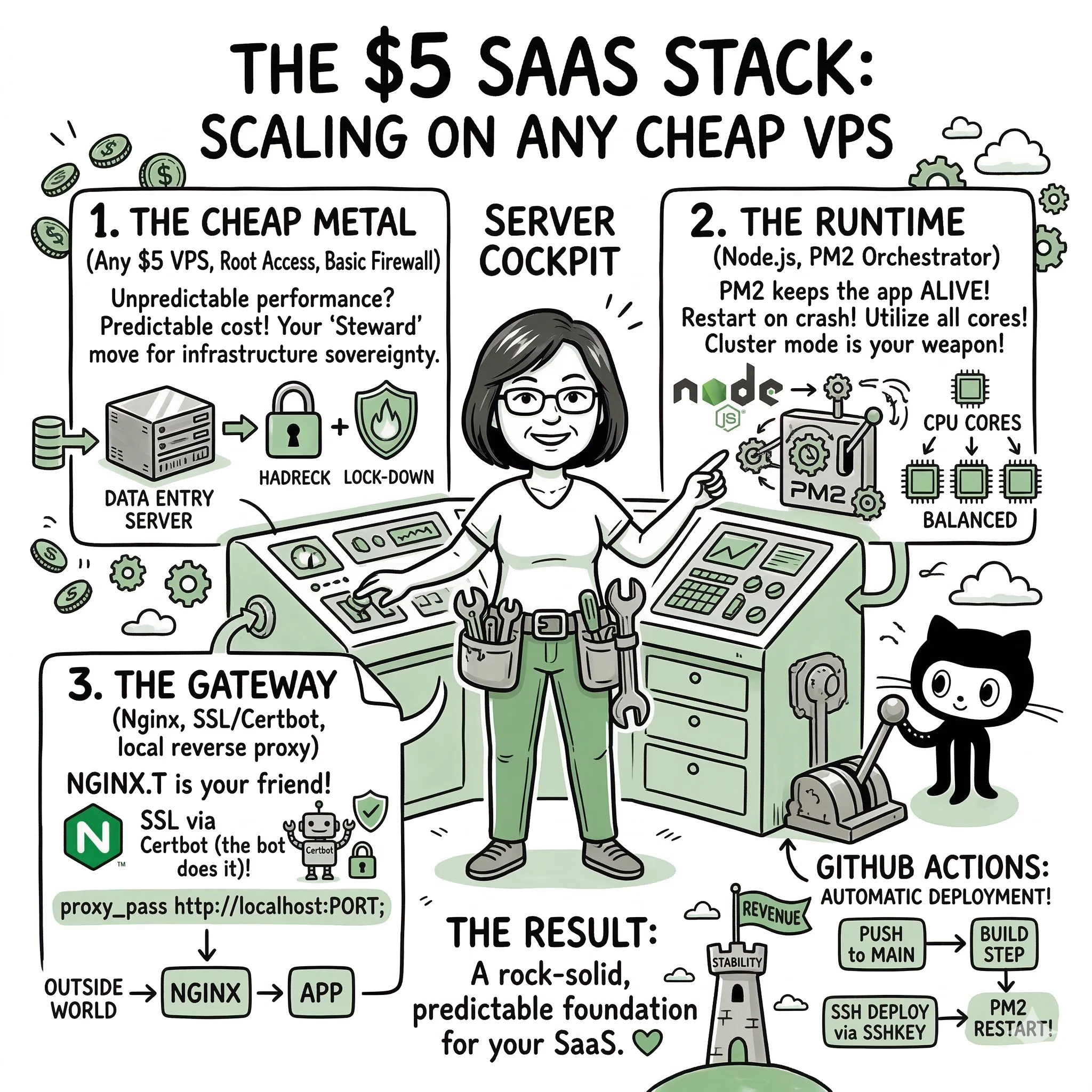
The beauty of this setup is that it’s framework agnostic. Whether you are building with Nuxt, SvelteKit, or Next.js, the infrastructure logic stays exactly the same. You can even run all three on the same $5 server!
This guide is the “Generic VPS Edition” of my deployment framework. It’s framework-agnostic—working perfectly for Nuxt 3, SvelteKit, or Next.js—and focuses on building a “Steward-class” environment on raw Ubuntu soil.
The 2026 Budget Contenders
If you’re wondering where to actually find a $5 server that doesn’t crawl, here are the current “Steward-approved” options:
- Hetzner Cloud (CX22): Around $4.15 USD. The best performance-per-dollar. You get 4GB RAM, which is plenty for a Node.js stack.
- Hostinger (KVM 1): Around $4.99 USD. Great for beginners with a very polished control panel.
- DigitalOcean (Droplet): $4.00 - $6.00 USD. The industry standard for developer experience and documentation.
- Vultr: Starts at $2.50 USD for very small instances, but their $5.00 tier is the sweet spot for global coverage.
Phase 1: The Raw Metal (Any VPS Provider)
Choose your provider, spin up an instance with Ubuntu 22.04 or 20.04 LTS, and let’s go.
1. Initial Access
Most budget providers give you a root password or ask for an SSH key during setup. I always recommend using SSH keys for safety.
2. Local SSH Config
Keep your terminal organized. Add your new server to your local ~/.ssh/config:
Host my-saas
    HostName YOUR_SERVER_IP
    User root
    IdentityFile ~/.ssh/id_rsa
Now you can just type ssh my-saas to get in. Simple. Tactical.
Phase 2: The Runtime Environment
Once you’re in, we need to prepare the server for Node.js.
1. Security First (User Setup)
Never run your app as root. Create a dedicated user:
adduser carmelyne
usermod -aG sudo carmelyne
su - carmelyne
2. Install Node.js & Build Tools
curl -fsSL https://deb.nodesource.com/setup_18.x | sudo -E bash -
sudo apt-get install -y nodejs build-essential nginx
Phase 3: The Orchestrator (PM2)
PM2 is what makes your $10 server feel like an enterprise cluster. It handles restarts, logging, and performance.
sudo npm install pm2 -g
The Universal ecosystem.config.js
Drop this in your app folder. It detects the framework and handles the execution:
module.exports = {
  apps: [
    {
      name: 'my-saas-app',
      exec_mode: 'cluster',
      instances: 'max',
      // Choose your script based on your framework:
      script: './.output/server/index.mjs', // Nuxt 3
      // script: './build/index.js',        // SvelteKit
      // script: './node_modules/next/bin/next', // Next.js (args: 'start -p 3001')
      env: {
        NODE_ENV: 'production',
        PORT: 3001
      }
    }
  ]
}
Phase 4: NGINX & The SSL “Whisper”
We use NGINX as a reverse proxy to handle the traffic and Certbot to handle the SSL certificates for free.
1. NGINX Config
Create /etc/nginx/sites-available/saas:
server {
    listen 80;
    server_name app.yourdomain.com;

    location / {
        proxy_pass http://localhost:3001;
        proxy_http_version 1.1;
        proxy_set_header Upgrade $http_upgrade;
        proxy_set_header Connection 'upgrade';
        proxy_set_header Host $host;
    }
}
2. SSL Activation
sudo apt install python3-certbot-nginx
sudo certbot --nginx -d app.yourdomain.com
Phase 5: CI/CD with GitHub Actions
The goal is Zero-Manual-Work. When you push code to GitHub, the server should update itself.
In your GitHub Repo > Settings > Secrets, add:
HOST: Your Server IPUSERNAME: carmelyneSSHKEY: Your Private SSH Key
Create .github/workflows/deploy.yml:
name: Deploy
on:
  push:
    branches: [main]

jobs:
  build:
    runs-on: ubuntu-latest
    steps:
      - name: Deploy via SSH
        uses: appleboy/ssh-action@master
        with:
          host: $
          username: $
          key: $
          script: |
            cd ~/my-app
            git pull origin main
            npm install
            npm run build
            pm2 restart ecosystem.config.js
Final Intent: Resilience over Complexity
By choosing a $10 VPS over a black-box platform, you are practicing Infrastructure Sovereignty. You know where your files are, you control your security, and your costs are fixed.
This setup is the foundation of every tool I build. It’s resilient, it’s fast, and it respects your budget. 💚
Explore the Framework
These concepts are part of a broader framework for building intent-aware AI systems. I've distilled these strategies into a short, practical guide called Thinking Modes.
View the Book →