


You no longer need a custom wrapper just to use Ollama cloud models inside your dev tools.
Ollama now supports launching supported apps directly, including Claude Code, Codex, OpenCode, and OpenClaw. If your goal is simple, this is the new clean path:
ollama signin
ollama launch claude --model glm-5:cloud
ollama launch codex --model glm-5:cloud
ollama launch opencode --model glm-5:cloud
ollama launch openclaw --model glm-5:cloud
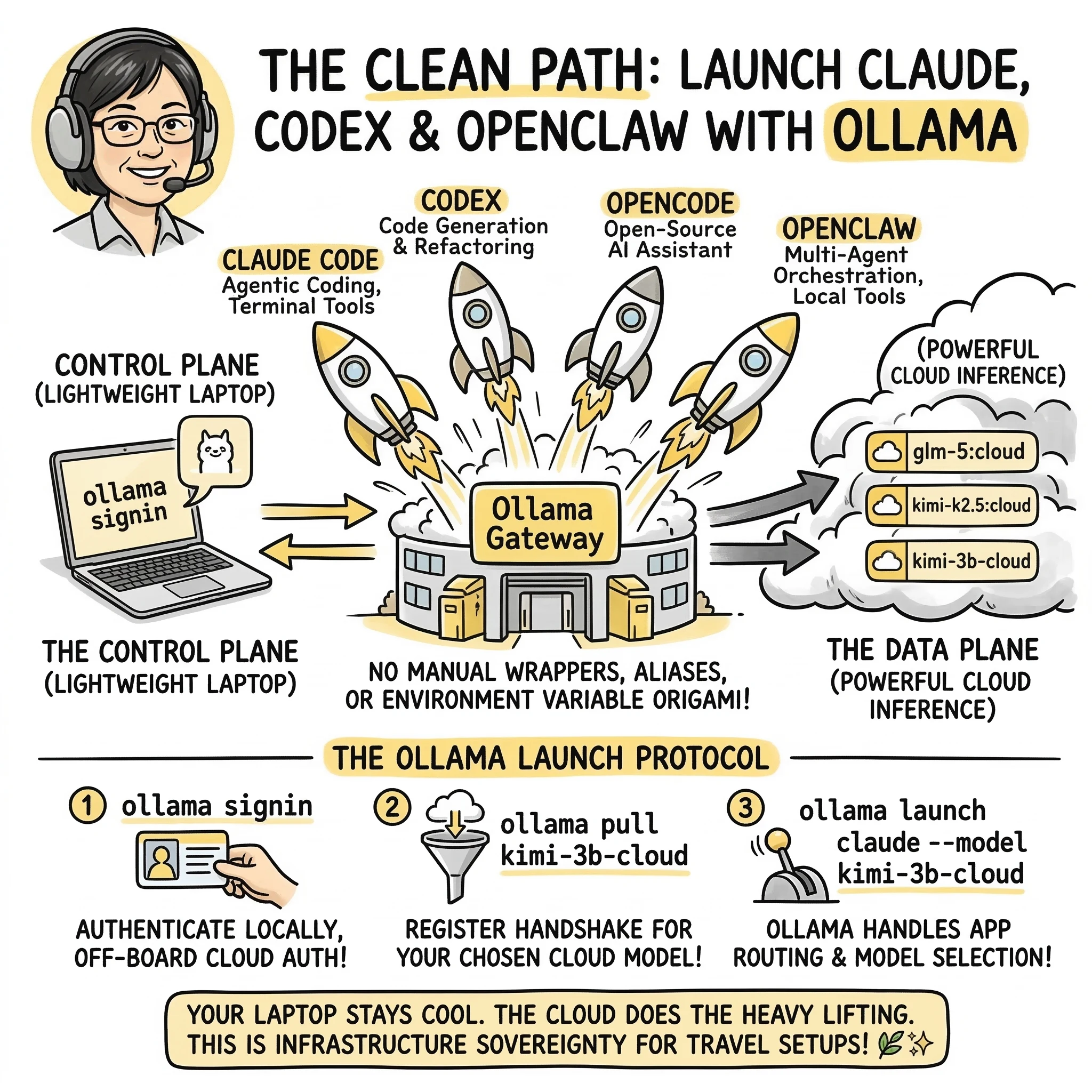
That means a lightweight laptop can stay the control surface while the actual model inference runs through Ollama’s cloud-backed flow.
Why this matters
The old manual route still works. But it is no longer the nicest front door.
Before, the setup usually meant juggling some combination of:
- local provider URLs
- compatibility layers
- environment variables
- wrappers and aliases
- app-specific config files
Now, for supported apps, Ollama can handle the launch flow itself.
That is a real upgrade.
Less terminal origami. More “pick app, pick model, go.”
📊 Quick Reference: Supported Launch Commands
| Application | Launch Command Example | Primary Focus |
|---|---|---|
| Claude Code | ollama launch claude --model glm-5:cloud |
Agentic coding, file system access, terminal tools |
| Codex | ollama launch codex --model glm-5:cloud |
Developer-grade code generation and refactoring |
| OpenCode | ollama launch opencode --model glm-5:cloud |
Open-source coding assistant workflows |
| OpenClaw | ollama launch openclaw --model glm-5:cloud |
Multi-agent orchestration and local tool execution |
What you need
You need:
- Ollama installed
- An Ollama account
- A sign-in session
- A supported cloud model
- One of the supported apps
For this workflow, the most important step is signing in locally:
ollama signin
If you are using your local Ollama installation as the launcher and gateway, this is the part that often surprises people:
You do not need to manually stuff an Ollama API key into your wrapper just to use cloud models from supported launched apps.
That is because Ollama can authenticate cloud-backed requests through your local signed-in install.
Why glm-5:cloud is a good example
glm-5:cloud works well as a reference model because it is simple, current, and easy to show across multiple app launch examples.
You can also swap in other supported cloud models depending on what Ollama currently exposes in its model library.
The important part is to use the exact model name Ollama shows for that cloud-capable model. Many cloud models use :cloud or -cloud style suffixes, but the safest move is still to copy the exact name from Ollama’s library.
What changed compared to the older wrapper method
If you have seen older guides, including mine, they usually focused on the manual route:
- point an app at
http://localhost:11434 - set compatibility environment variables
- create a shell wrapper
- optionally create aliases per model
That method still has value. It is useful when you want:
- explicit environment control
- manual routing behavior
- older or custom tool setups
- deeper debugging visibility
- a fallback when launcher support is missing
But for supported apps, ollama launch is now the cleaner default.
🧠 The Truly Deep Ollama Launch FAQ
For the developers who want the clean path to infrastructure sovereignty.
1) Core concept / explainer FAQs
What is `ollama launch`?
It is a new command that allows Ollama to act as an app launcher and model router for supported developer tools like Claude Code, Codex, and OpenClaw.
Do I still need a custom wrapper script?
No. For supported apps, ollama launch replaces the need for manual wrappers, aliases, and environment variable ‘origami’.
Does this mean Ollama is a cloud provider now?
Ollama is acting as a gateway. Your local machine is the Control Plane, while the heavy inference is offloaded to Ollama’s cloud-backed Data Plane.
2) Getting Started FAQs
What are the requirements for `ollama launch`?
You need Ollama installed, an Ollama account, and to be signed in locally via ollama signin.
Do I need an API key for every app?
No. When using ollama launch, your local signed-in session handles the authentication for the cloud-backed requests automatically.
Is `ollama signin` the same as an API key?
No. ollama signin is for the local launcher flow. OLLAMA_API_KEY is for direct programmatic access to the hosted API at ollama.com.
3) Supported Apps & Models FAQs
Which apps are supported by `ollama launch`?
Currently supported apps include Claude Code, Codex, OpenCode, and OpenClaw.
Can I use any model with these apps?
Yes, you can specify any supported cloud model using the --model flag, such as glm-5:cloud or kimi-k2.5:cloud.
Do I need to 'pull' the model first?
Yes. Run ollama pull <model-name> before launching. The ‘pull’ is near-instant because it only registers the remote handshake.
4) Advanced & Troubleshooting FAQs
Is the old manual wrapper method obsolete?
No. The manual route is still useful for tools not yet supported by ollama launch or when you need granular environment control.
What if my laptop is old or has no GPU?
That is the best part! ollama launch offloads the heavy lifting to the cloud, making it perfect for MacBook Airs and travel setups.
Where can I see what's happening under the hood?
You can run ollama logs in a separate terminal to see the request routing and verification headers.
Local gateway vs direct cloud API
This is where people get mixed up.
There are two different patterns:
1. Local Ollama as the gateway
This is the setup used by ollama launch. Your app talks through your local Ollama install. Ollama handles the cloud-backed routing for supported requests. In this mode, signing in with ollama signin is the important step.
2. Direct hosted API access
This is when you call Ollama’s hosted API directly instead of going through localhost. That is the path where an API key matters more explicitly.
So if you are using ollama launch, the mental model is:
- app
- local Ollama launcher
- signed-in cloud access
Not:
- app
- custom wrapper
- hand-managed cloud key for every launched app
Why this is good for lightweight laptops
This setup is a strong fit for:
- MacBook Air workflows
- older laptops
- travel setups
- developers who do not want to maintain a GPU rig
- people who want access to larger models without local hardware drama
Your machine stays useful as the working surface. The heavier inference load is no longer the laptop’s problem in the same way.
Summary
Ollama is no longer just acting like a local model runner here. It is acting more like an app launcher and model router. That changes the setup story.
For supported apps like Claude Code, Codex, OpenCode, and OpenClaw, the clean path is now:
ollama signin
ollama launch <app> --model glm-5:cloud
That is simpler to explain, easier to use, and better aligned with how most people actually want to get started.
END_OF_REPORT 🌿✨