


How we gave an AI coding agent a low-latency, fully offline voice on an old 2016 MacBook Pro (Intel CPU, Arch Linux) using Python 3.14, kokoro-onnx, and mpv.
The TL;DR
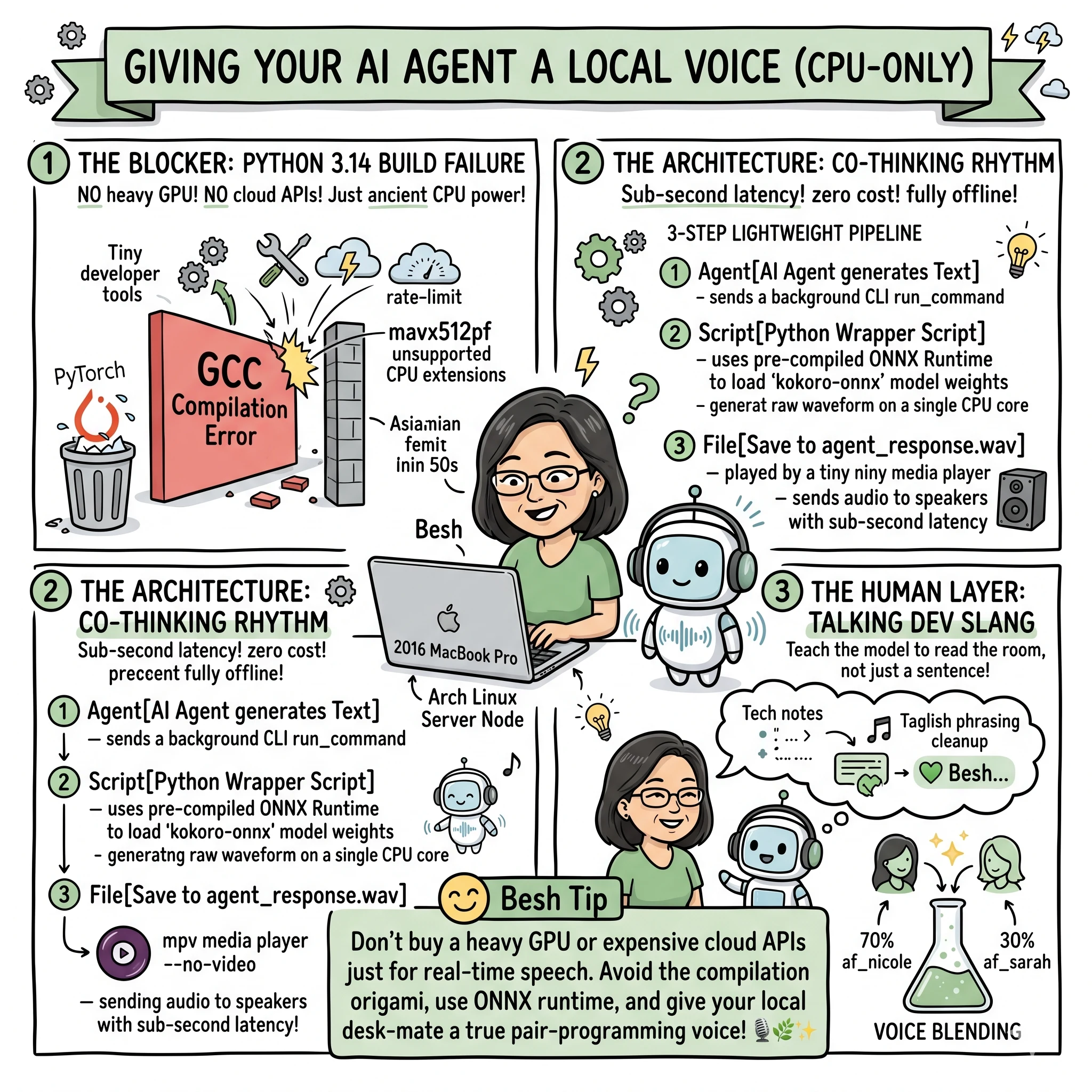
Most developers think you need a heavy GPU or expensive cloud APIs to get high-quality, real-time Text-to-Speech (TTS) for AI agents.
We built an offline, zero-cost, sub-second latency speech pipeline on 10-year-old laptop hardware. Here is the stack, the roadblocks we hit (hello, Python 3.14 compilation errors), and the code to do it yourself.
The Blockers We Hit
- Cloud APIs are too slow: Cloud TTS adds network roundtrips, rate-limits, and cost. It ruins the flow of a real-time agent pair-programming session.
- Python 3.14 build failures: Installing standard kokoro tries to compile spacy and blis from source. On older CPUs or Arch setups, GCC fails with unsupported CPU vector extensions (like
-mavx512pf).
The Solution: Avoid standard PyTorch/pip compilation paths. Use ONNX Runtime (kokoro-onnx). It uses pre-compiled wheels, loads instantly, and runs inference on a single CPU core in milliseconds.
The Human Layer: Beyond Generic TTS
Technical setup is one thing, but making an AI feel like a true pair-programming partner requires a human touch. A generic “assistant” voice can feel clinical. By adding a small layer of personality, the terminal transforms from a tool into a collaborator, much like I detailed in my post on Ambient Audio Hooks.
1. The “Co-Thinking” Rhythm
Instead of waiting for a wall of text to finish streaming, hearing your partner “talk through” a problem in the background creates a shared mental model. It mirrors the flow of real-life collaboration where one person speaks while the other is already mentally parsing the solution.
2. Phonetic Tweaking for Local Slang
Standard TTS models often struggle with dev-specific slang or local colloquialisms. We implemented a simple regex layer before the text hits the model to fix pronunciations:
- Technical fixes: Ensuring acronyms or specific tool names sound natural.
- Cultural rhythm: Adjusting the cadence so it matches the speaker’s own linguistic habits (like Taglish phrasing).
The Architecture
graph TD
    Agent[AI Agent generates Text] -->|Runs background CLI| Script[Python Wrapper Script]
    Script -->|Loads ONNX Runtime| Kokoro[kokoro-onnx model]
    Kokoro -->|Generates raw waveform| File[Save to agent_response.wav]
    File -->|Command-line play| MPV[mpv --no-video]
    MPV -->|Output| Speakers[Laptop Speakers]
Step-by-Step Guide
1. Install System Audio Drivers
Ensure you have a lightweight player like mpv installed (which handles raw .wav output beautifully without bloating system memory):
# Arch Linux
sudo pacman -S mpv

# macOS
brew install mpv
2. Set Up a Clean Virtual Environment
Avoid polluting your system python. Create a venv and install kokoro-onnx and soundfile (for saving .wav files). We use Kokoro TTS for the model, powered by the ONNX Runtime for maximum performance on older CPUs.
python -m venv venv
source venv/bin/activate
pip install kokoro-onnx soundfile
3. Download the ONNX Model & Voice Data
Grab the lightweight ONNX model weights and voice maps from Hugging Face:
wget https://huggingface.co/onnx-community/Kokoro-82M-ONNX/resolve/main/onnx/kokoro-v1.0.onnx
wget https://huggingface.co/onnx-community/Kokoro-82M-ONNX/resolve/main/voices-v1.0.bin
4. The Python Speech Wrapper (speak_message.py)
Save this script locally. It accepts text, applies custom phonetic rules, and outputs it immediately via mpv.
import os
import re
import subprocess
import sys
import soundfile as sf
from kokoro_onnx import Kokoro

# Paths to files
MODEL_PATH = "kokoro-v1.0.onnx"
VOICES_PATH = "voices-v1.0.bin"
OUTPUT_PATH = "agent_response.wav"

def play_audio(file_path):
    try:
        subprocess.run(
            ["mpv", "--no-video", file_path],
            check=True,
            stdout=subprocess.DEVNULL,
            stderr=subprocess.DEVNULL
        )
    except Exception as e:
        print(f"Error playing audio with mpv: {e}")

def main():
    if len(sys.argv) < 2:
        return

    text = " ".join(sys.argv[1:]).strip()
    if not text:
        return

    # --- PHONETIC CLEANUP ---
    # Strip UI markers and fix specific pronunciations

    # Example: Fix local slang or tech terms
    # text = re.sub(r'\b[Bb]esh\b', 'bess', text)
    # ------------------------

    if not os.path.exists(MODEL_PATH) or not os.path.exists(VOICES_PATH):
        print("Model files missing.")
        return

    kokoro = Kokoro(MODEL_PATH, VOICES_PATH)

    samples, sample_rate = kokoro.create(
        text,
        voice="am_puck",
        speed=1.0,
        lang="en-us"
    )

    sf.write(OUTPUT_PATH, samples, sample_rate)
    play_audio(OUTPUT_PATH)

if __name__ == "__main__":
    main()
5. Pro Tip: Voice Blending 🧪
One of the most powerful features of kokoro-onnx is the ability to blend multiple voices. If a single voice sounds too generic, you can mix two (or more) to create a unique hybrid persona.
For example, blending af_nicole (upbeat) with af_sarah (soft/steady) at a 70/30 ratio creates a voice that is energetic but grounded:
# Create a blended voice
# This combines two voices into one unique hybrid model
voice_blend = kokoro.get_voice_style("af_nicole") * 0.7 + \
              kokoro.get_voice_style("af_sarah") * 0.3

samples, sample_rate = kokoro.create(
    text,
    voice=voice_blend, # Use the blend instead of a single string
    speed=1.0,
    lang="en-us"
)
The Agent Integration
Since the AI agent has direct shell execution tools (run_command), the integration is dead simple. Whenever the agent formulates a message response, it concurrently spins up a background task. If you’re building out these types of agentic workflows, check out my A Better Codex CLI Wrapper for more on managing agent interactions.
python speak_message.py "Your response text goes here"
This starts playing the audio through the system speakers while the text response streams into the UI. No cloud latency, no subscription keys, and fully offline.
Final Thoughts: The Soul in the Machine
Giving an AI agent a voice isn’t just a gimmick. It’s about Vibe Coding vs. Agentic Engineering—making a workspace that feels alive and intentional. In a world where we spend hours staring at a terminal, having a partner that “sounds” human—with all the little phonetic quirks and rhythms that match your own—makes the work feel less solitary. It’s about building a workspace that feels alive.
Shared vibes in local pair-programming.